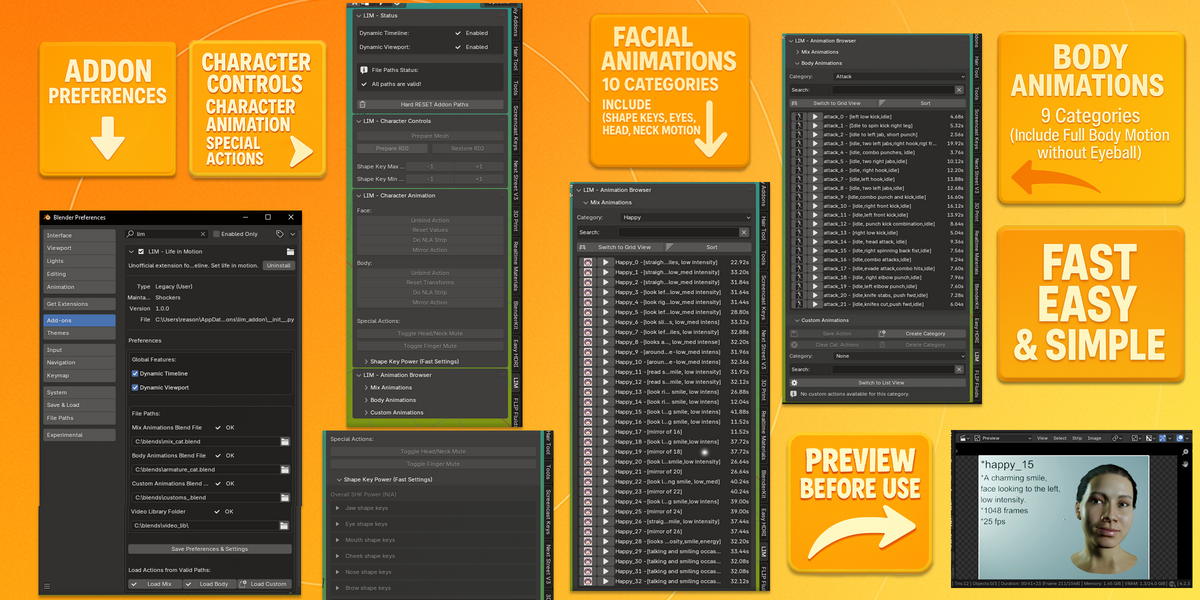
LIM, by LIM - Life in Motion, is a Blender add-on for animating characters built with Human Generator Rigify rigs. Its animation browser brings together more than 360 ready-made body and facial actions, with tools for previewing, mirroring and adjusting clips. The Superhive product listing and LIM documentation describe its features and rig support.
Browse and manage animation actions
The library contains 166 body animations across nine categories and 196 facial animations across ten categories. Facial actions cover eyes, head, neck and shape key motion. All facial animations are loopable; more than half of the body animation categories support seamless loops.
The built-in Animation Browser can preview clips and their descriptions before you apply them. It works across projects, and you can save your own Armature or Object Actions in external Blender files for use in the browser. LIM lists available actions during a session and loads an action into the current project when you choose to apply it, rather than importing the whole library at once.
Controls for editing and mixing clips
Hold D + F and move the mouse to scrub the timeline from the 3D Viewport or Graph Editor. The Dynamic Viewport switches between Pose Mode and Object Mode based on what you select; the documentation says this feature is currently optimized for scenes with one character.
Mirror Full Animation mirrors both the body armature and facial tracks, including shape keys. Shape Key Power adjusts a facial clip's intensity across its length, globally or per key. You can also mute head, neck or finger channels when mixing motion, detach actions, reset poses or shape keys, and send actions to the NLA editor.
Rig support and compatibility
LIM's animation library is designed for Human Generator's Rigify-based armatures. The developer says Human Generator is not required for every feature, but applying the included animations to other Rigify rigs may produce misalignment because bone names, hierarchy and proportions can differ.
The marketplace listing gives a Blender version range of 4.2 to 5.0 and lists Cycles and Eevee. Check the documentation and changelog for instructions that match your Blender version. The 2025-12-21 v1.0.1 changelog warns that reusing the same customs_.blend file across Blender 5.x and older versions will not work correctly and may cause unexpected errors. The docs also describe an NLA edge case where combined head and neck motion may look offset in the preview; they say the exported or rendered result remains correct and provide a workaround tutorial.
Price and animation licensing
A third-party catalog labels LIM as free, while the Superhive FAQ describes a one-time purchase with future updates. Check the marketplace listing for its current price and terms.
Superhive lists the add-on license as GPL. The documentation describes a separate license for the animation assets: it permits personal and commercial project use, including modifying or baking animations into characters and exported scenes, but prohibits reselling or distributing the raw animation files. Read the included asset license PDF before reusing or sharing those files.