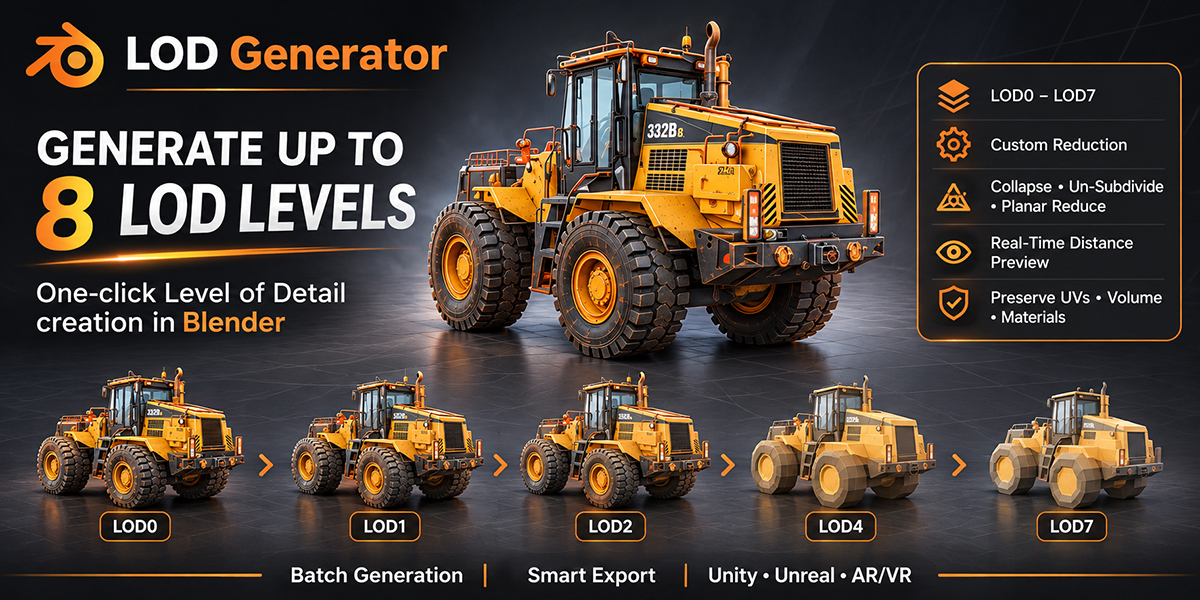
LOD Generator is a Blender add-on from Dreamy Art World for creating lower-detail mesh versions and preparing assets for real-time projects. The AnyPlugins catalog lists version 2.0, while the linked Superhive product page and documentation identify version 3.0. Check which version the download contains before following version-specific instructions.
Generate and protect LOD meshes
The version 2.0 catalog entry describes up to eight levels, from LOD0 through LOD7, with options to reduce multiple selected objects. The version 3.0 product page also advertises LOD0 through LOD7, while its manual describes four generated levels, LOD1 through LOD4.
The product material describes Collapse, Un-Subdivide and Planar reduction methods. It also documents UV seam protection, volume preservation and vertex groups that retain detail in selected areas. Results can depend on the source mesh topology, so inspect the generated meshes at their intended viewing distances.
Preview imposters and prepare exports
The version 3.0 listing describes a viewport distance preview and a HUD for checking the active LOD and geometry counts. It also describes eight imposter types, including billboards, flipbooks, bounding boxes and hybrid billboard clouds. Atlas baking is listed at resolutions up to 8K.
Export options described in the product materials include FBX, GLB and OBJ, with Unity and Unreal Engine metadata. The version 3.0 product page describes automatic texture relocation, while its manual says companion textures and baked imposter atlases are copied when Copy Companion Textures is checked. These features may help artists preparing props, scanned meshes, foliage or environment assets for real-time projects.
Check the version and compatibility
The version 2.0 catalog requires Blender 4.1 or later. Version 3.0's product page says Blender 4.2 LTS through 5.2+ in its heading; its compatibility table lists 4.0, 4.1, 4.2 LTS, 4.3, 5.0, 5.1 and 5.2, while its marketplace details say 4.1 through 5.3. The version 3.0 manual says Blender 4.0 through 5.2+ is supported. Check support for the exact package and Blender version before installing, then use its matching documentation.
The version 2.0 FAQ says animation is not preserved. The version 3.0 product page lists embedded animations in AR/VR and WebXR GLB exports, but its manual does not establish broader animation preservation. Confirm support for your intended animation workflow before relying on it.