Magic Vertex Painter is a Blender add-on for painting asset distribution onto a mesh instead of placing every instance by hand. Its product page lists version 8.0.0 and describes it for environment artists and game developers working with vegetation, rocks and other repeated scene assets. Brush strokes set where the assets appear, while channel controls adjust their distribution. See the seller's product listing for the current release details.
Paint and tune up to 10 channels
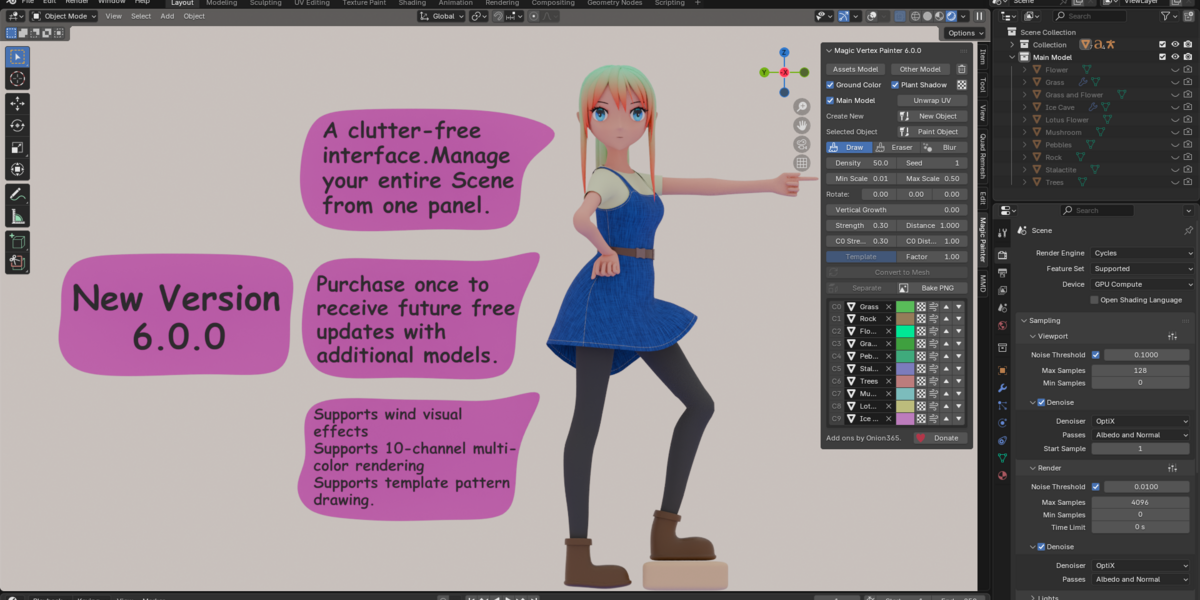
The seller's documentation describes starting with a built-in object or applying the system to a selected mesh. Draw, Eraser and Blur brushes add assets, remove painted areas and soften transitions. The version 5.0.0 guide lists density, seed, minimum and maximum scale, and rotation controls for channels C0 through C9; it says enabling wind replaces the Rotate control with Wind 1 and Wind 2 speed controls. The 8.0.0 update notes say each channel can support a mix of multiple models, allowing more than one model type in a channel.
A Vertical Growth control changes whether instances follow the mesh's surface normal or stay upright along the world's Z axis. This is useful when the same scatter needs to behave differently on a slope and on flatter ground. The seller's documentation covers the painting controls, though that guide is labeled version 5.0.0.
Shape placements with masks and materials
A global ground mask uses a black and white image to define paths, clearings or transitions across the ground. Each asset channel can also use its own template mask, so a painted area and a texture can jointly shape where that channel appears. Custom images can be assigned as masks.
The add-on's procedural ground material includes Noise, Voronoi, Wave and Brick textures controlled with a Color Ramp. Its Plant Shadow feature blends color onto the ground beneath scattered assets. These controls help vary the surface and the painted distribution without placing each object individually.
Preview wind and prepare assets for export
Wind can be enabled separately for each channel. The product listing describes independent dual-speed controls; the seller's documentation says to play Blender's timeline to preview the animation.
For export work, the documented workflow ends the painting session before converting scattered instances to mesh geometry. The product listing includes mesh conversion, separation by material, mesh cleanup, texture baking, atlas baking and a Bake PNG and Export FBX for UE5 option. The listing names both Cycles and Eevee as supported render engines, and says baking requires Cycles. The documentation warns that converting to mesh is destructive and difficult to undo, so keep a working copy before that step.
Check compatibility details before installing
The product page's requirements section says Windows only and Blender 4.5 or newer, while its marketplace details list Blender 5.2 to 5.3. The documentation page is labeled version 5.0.0, while the product listing identifies version 8.0.0. Confirm compatibility and check the seller's current instructions for your release before installing.