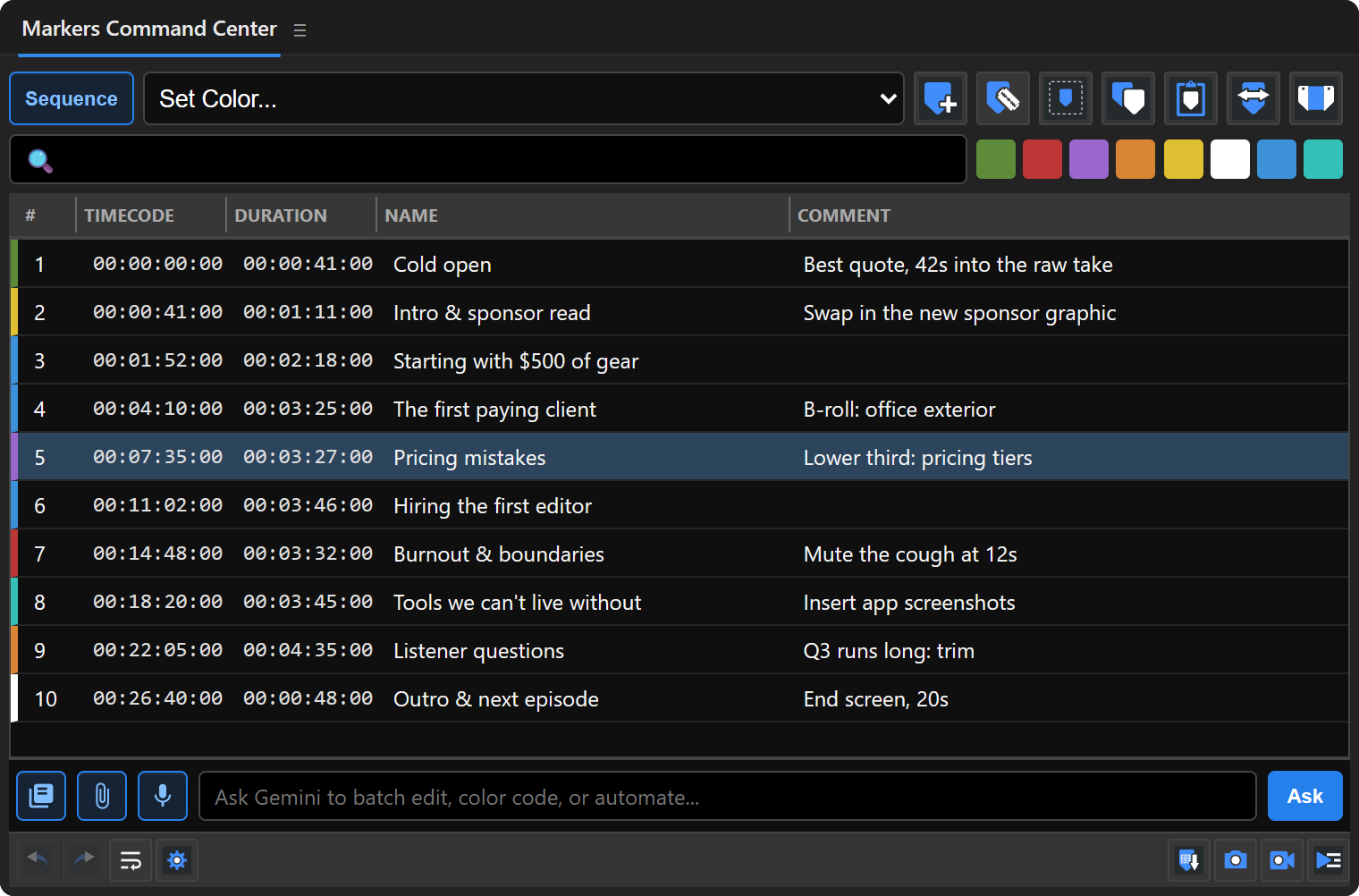
Markers Command Center is a panel for Adobe Premiere Pro that combines sequence and clip marker tools with batch operations, exports, and an AI assistant. Editors can turn review notes or transcripts into markers, organize marker lists, and use marker positions to guide timeline edits. The developer's product page describes version 2 and its current feature set.
Manage sequence and clip markers
Switch between sequence and clip markers with Shift+X. The marker list includes search, color filters, editable names and comments, and word wrap for longer notes. You can add markers at intervals or selected clips, copy and paste them between clips and sequences, shift their timing, set a shared duration, or add cuts at marker positions. Most panel tools use the selected markers; when none are selected, they work with the markers currently shown in the list.
Import notes and export edit material
The AI bar can attach review notes, CSV, SRT, JSON, and transcript files for marker work. For handoffs, the panel can export listed markers to CSV with chosen columns or copy them as YouTube chapter lines. It can also export PNG stills at selected markers and render marker ranges through Adobe Media Encoder.
Use prompts for timeline operations
The AI assistant accepts prompts through Gemini, OpenAI, or a local model served by LM Studio. The developer lists Qwen, Llama, and Mistral as local model examples. Prompts can create or revise markers, select clips by properties such as speed or duration, make cuts at markers, ripple-delete a range, adjust clip speed, or add effects and transitions. The assistant sends commands to Premiere Pro one at a time and reports what changed after each reply.
For local AI, the model runs on your own machine through LM Studio. Cloud APIs remain available if you prefer them. Check the provider and model setup that fits your project's data-handling requirements.
Review undo behavior before changing a sequence
Undo depends on the command. Some marker and clip changes use Markers Command Center's own undo history; others use Premiere Pro's Edit > Undo. Selection and track-state commands have no undo. Read the panel's status message after each reply, and duplicate the sequence before trying an unfamiliar timeline operation.
Check fit and compatibility
The panel may suit editors who regularly process review notes, build chapters, cut at marker positions, or export groups of frames and clips. Its broader command set may be unnecessary for occasional marker edits. The developer's listing names Premiere Pro 2021 through 2027 as compatible; check the current listing if you use another release or need current trial and upgrade details.