Mat Assign is a Blender add-on by Hisoka852 for copying and pasting materials in the 3D Viewport. Hover over a mesh and use a modifier key to copy or paste its material. The workflow does not require prior object selection. The Superhive product listing describes its features and compatibility.
Copy and paste beneath the cursor
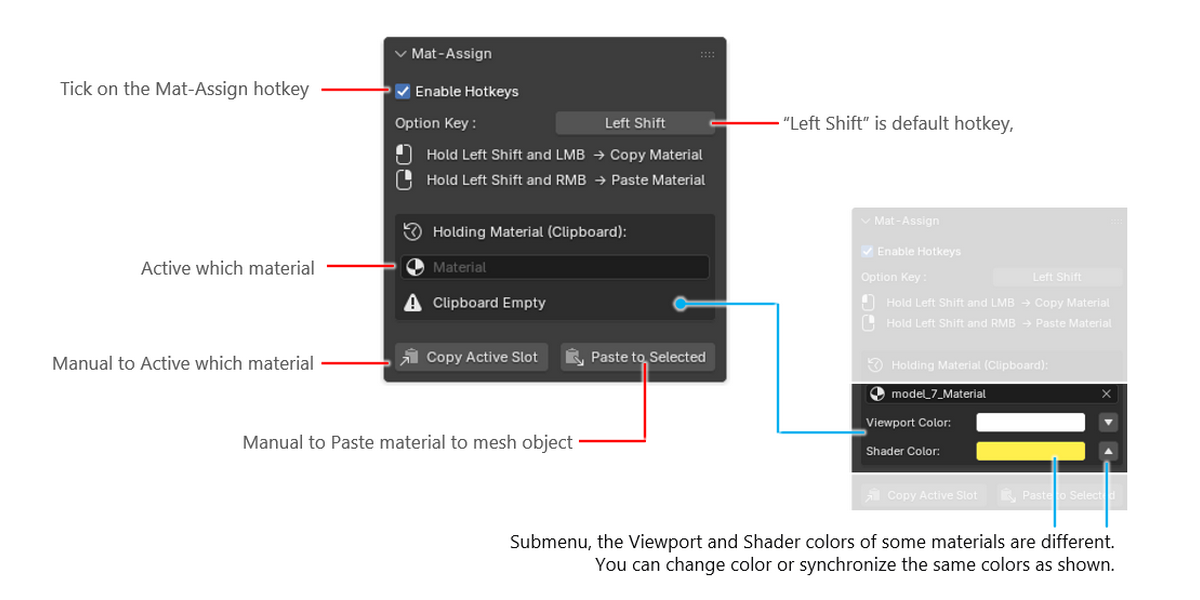
Hold Shift, or your chosen modifier key, then left-click over a mesh to copy its material. Right-click over another mesh to paste. The interactive Capture Key feature lets you change the modifier.
Generate missing materials and sync color
If an object has no material, Mat Assign creates a Principled BSDF and preserves the object's original viewport color. Its UI panel also lets you push color from Viewport Display to Shader Base Color, or pull it back in the other direction.
Blender compatibility and license
The listing specifies Blender 4.2 through 5.1 and marks Mat Assign as Blender Extension compatible. It identifies the product as an add-on under the GPL license and lists Blender-Internal, Cycles, and Eevee as render engines. Documentation and a demo video are linked from the product listing.