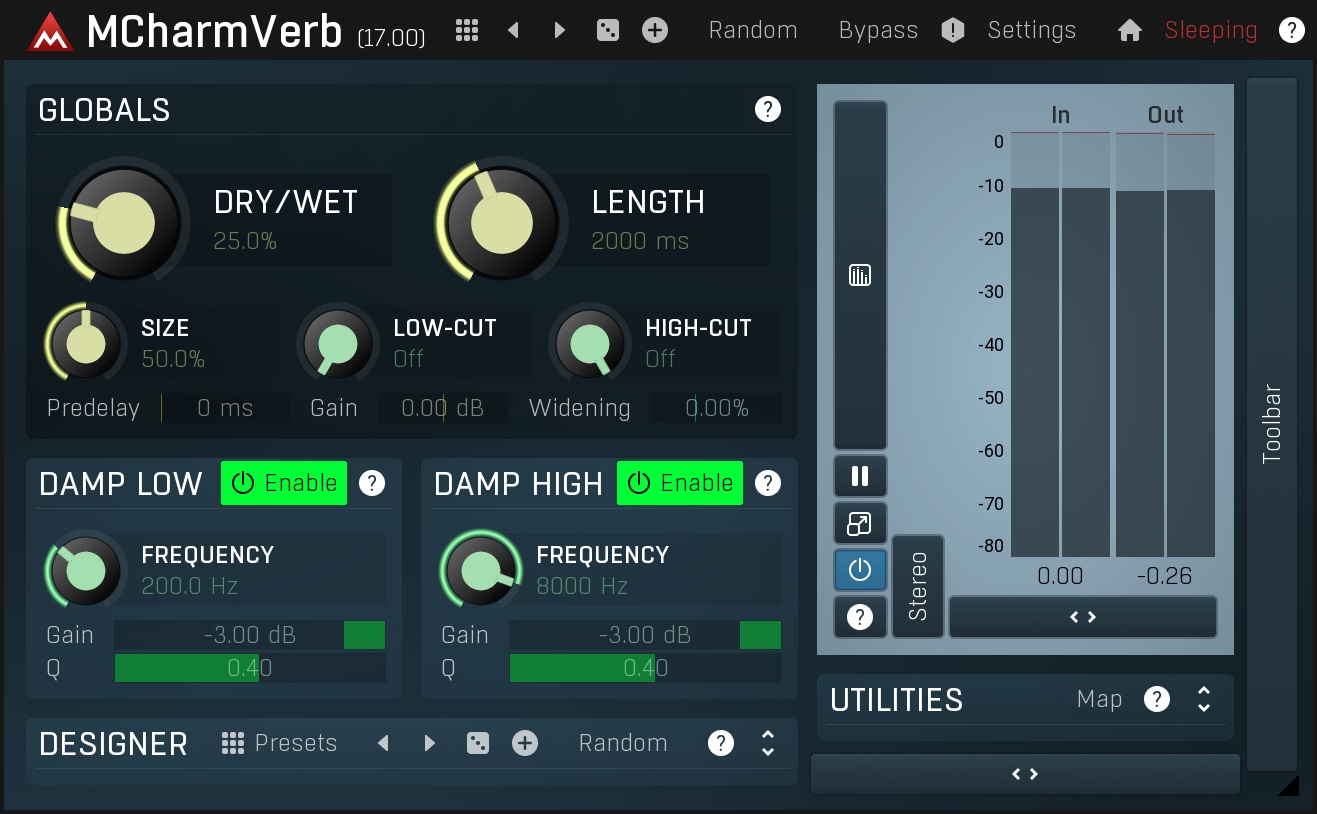
MeldaProduction describes MCharmVerb as an algorithmic reverb based on the MTurboReverb engine. Its controls shape the reverb tail, from decay length and room size to predelay, damping and stereo width. Melda lists it as a free effect available with MFreeFXBundle. See the MCharmVerb product page for the current offer.
Set it up as an insert or send
On an insert, use Dry/Wet to balance the direct signal against the reverb. For a send effect, the manual recommends placing MCharmVerb on a dedicated bus, setting Dry/Wet to 100%, then controlling the amount with each track's send level.
Length sets the approximate time for the reverb to decay to -60 dB. Its range is 100 ms to 60 seconds, though other settings can change the actual decay. Size changes the delay lengths that define the virtual room. Predelay adds up to one second before the reverb begins, which can separate its onset from the source. Low-cut and high-cut filter bass and treble from the reverb signal. Damp Low and Damp High shape its frequency response to simulate absorption by air and walls.
Widening adjusts the stereo field of the reverb signal while leaving the original signal's width intact. The manual warns that larger amounts can sound unnatural or fatiguing and advises caution when increasing the width.
Shape the reverb algorithm
The Designer panel exposes controls for the reflection pattern. Complexity changes the structure of the reverb; higher settings use more CPU. Depth adds modulation to the input and can give the tail an evolving character, though Melda warns that too much can sound artificial. The Seed control makes the algorithm repeatable: the same seed produces the same result, while changing it generates a different sequence.
Delay Min, Delay Max, Delay Focus and Delay Order change the spacing and density of reflections. Delay Width controls the tendency for delay lengths to differ between channels. If you would rather start from an existing sound, the plugin includes presets and smart randomization based on existing presets. Its MCharmVerb manual explains these controls and their ranges.
Compare settings and use multichannel modes
The A-H selector stores up to eight settings. A/B switches between the last two selected states, while Morph blends the first four with an XY pad. Morphing affects parameters that support automation or modulation, but the morph control itself cannot be automated. It also changes the selected state, so the manual recommends using E-H as the destination if you want to preserve A-D.
MCharmVerb supports mono and stereo processing, mid/side modes, up to eight-channel surround and up to 64-channel, seventh-order ambisonics. For VST2, Surround needs the global Activate Surround setting and a host restart; VST3, AU and AAX need no activation for this mode. Ambisonics uses a separate global setting and also needs a host restart; Melda notes that DAW support for it remains uncommon.
Check compatibility and activation
Melda lists 64-bit support for Windows 10 and 11 with VST, VST3 or AAX hosts, and for macOS 10.14 Mojave or newer with VST, VST3, AU or AAX hosts. The Windows requirements specify an Intel or AMD processor with SSE2 support; the macOS requirements list Intel, AMD or Apple Silicon CPUs. Linux is not directly supported, though Melda says the plugins may run through Wine if the user's .wine/drive_c/windows/Fonts/ directory contains Microsoft TrueType fonts. Check the product support page and system requirements for host details. Melda directs users to MPluginManager for installation and updates.
MCharmVerb uses license-file activation. A license is tied to one person and can be used on that person's computers; activation needs neither a dongle nor an internet connection.