Mesh Source is a Blender add-on that converts selected meshes into Python source code. It is aimed at Blender script and add-on developers, as well as 3D model authors who want to store or distribute reusable meshes.
Turn selected meshes into reusable code
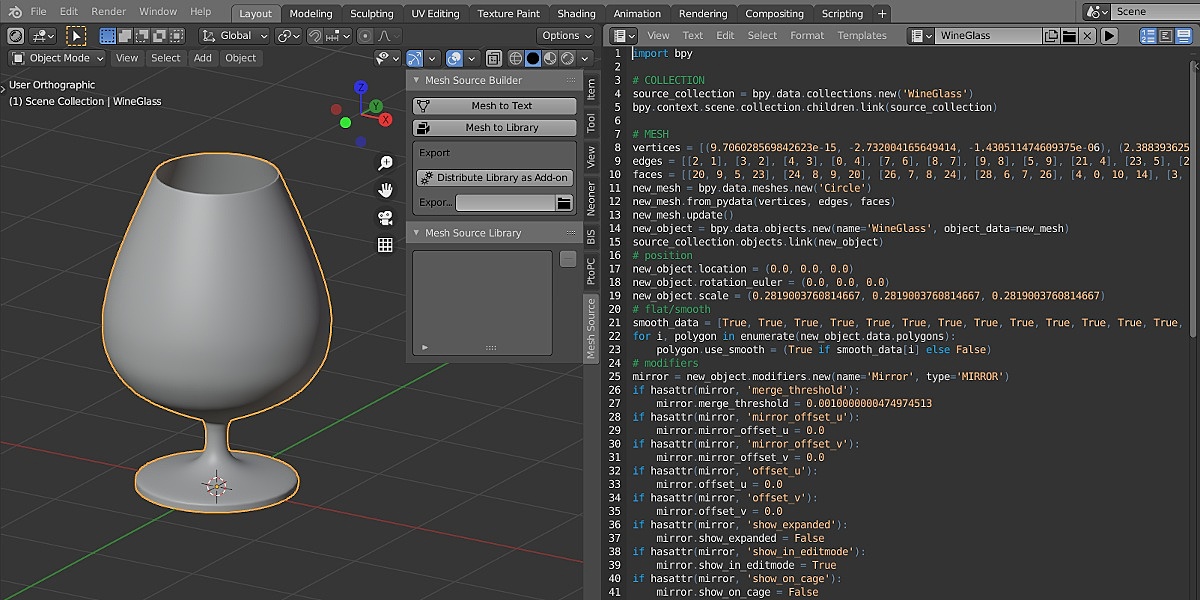
Click Mesh to Text to generate code for the selected meshes in Blender’s Text Editor. Copy the code or save it to a text file, then paste or open it in another Blender project. Running it with Run Script recreates the same set of meshes.
The generated source supports mesh points, edges and polygons, along with vertex groups, UVs and the mesh modifier stack. You can also append the code to a script or add-on. An add-on developer can expose code execution through the interface so users can create the meshes directly.
Save and distribute a mesh library
Use Mesh to Library to save mesh source code in Mesh Source’s local library; saved meshes can be loaded from there. To share a collection, specify a path and choose Distribute Library as Add-on. Mesh Source creates an archive containing an add-on with the library, which recipients can install to use the included models.
Find it in Blender and check compatibility
Open the 3D Viewport’s N-panel and select the Mesh Source tab. The product description lists Blender 2.83, 2.90, 2.91, 2.92, 2.93 and 3.0 through 3.5. Its Details section ends the version list at 3.4, so confirm the listing for a specific release. The developer also warns that code generated in one Blender version may not work correctly in another.
Materials assigned to a mesh are not processed by Mesh Source. The product page points to the separate NodeTree Source add-on for working with materials. See the Mesh Source product listing for source details and availability.