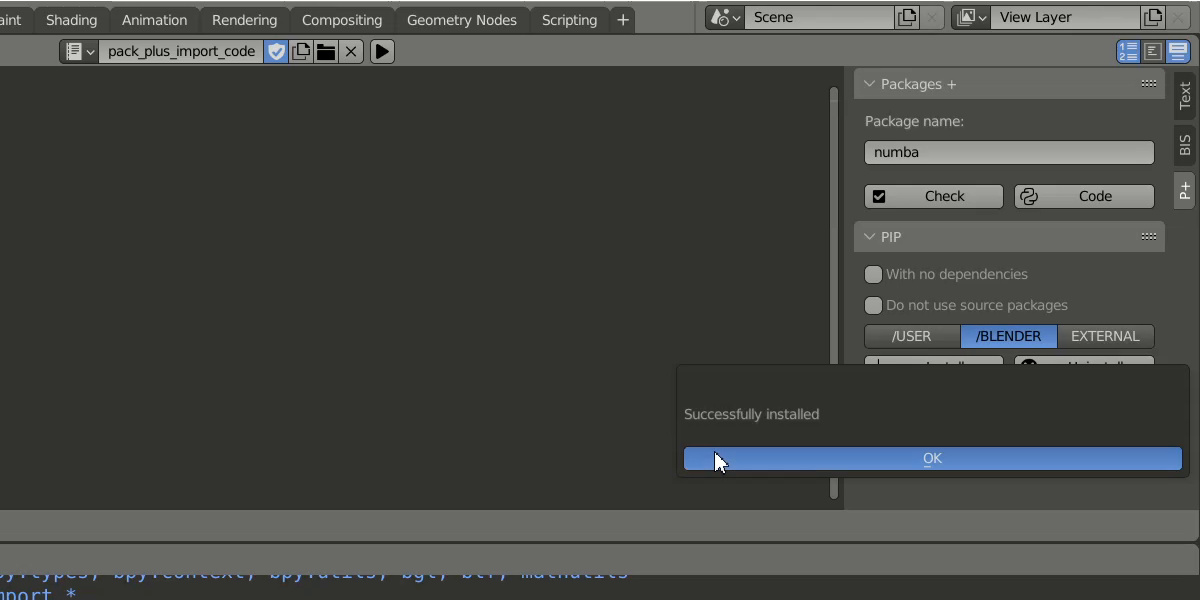
Packages Plus is a Blender add-on by Nikita Akimov for installing and managing additional Python packages from PyPI. Choose an install location based on how you plan to use the package: in Blender, in your user home directory, or in a custom external directory. See the product listing and documentation.
Choose where to install packages
- Blender directory: Packages are available throughout that Blender installation, including in Text Editor scripts and the Python Console with a regular
importstatement. - User home directory: The package does not affect the current Blender installation and can be called from any Blender version installed on your computer. A single
importstatement is not enough for this setup; use the add-on's Code button to get the import code for a script. - External directory: Choose a custom location. The listing describes this option for cases where you include packages directly in a script or add-on.
Check and remove installed packages
Enter a package name and use Check to see whether it is installed and where it is located. To remove a package, enter its name and select Uninstall. Packages Plus appears in the N panel under the P+ tab in both Blender's 3D Viewport and Text Editor.
Install the add-on and check compatibility
Download the add-on ZIP archive. In Blender, open Preferences, go to Add-ons, choose Install, and select the archive. The product listing names Blender 2.93 and 3.0; its documentation describes Blender 2.93 and 3.x. Check the developer's page for compatibility details before using it with a different release.
The creator marks Packages Plus for advanced users and warns that installing or managing Python packages can damage a Blender installation or the operating system. Review the package and its requirements before installing it.