Script Runner is a Blender add-on for running Python scripts from a panel without first loading each one into Blender’s Text Editor. It is useful when an external program creates a script for Blender or when you edit scripts in a separate editor and want to run them in Blender.
Run scripts from exporters and external editors
For example, the product listing describes using Script Runner with programs such as SynthEyes that export generated Python scripts. You can move between the exporter and Blender to adjust an export without repeatedly opening the Text Editor, loading the script, running it, and closing its text block. The add-on also suits editing a script in an editor such as Notepad++ and then running it from Blender.
Scripts can stay anywhere on your computer, and Script Runner does not require changes to Blender file paths.
Keep frequently used scripts ready
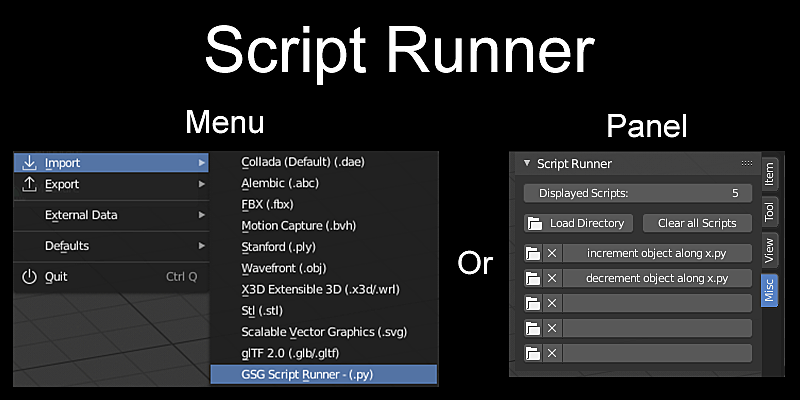
Script Runner saves paths to frequently used scripts, so you do not have to enter them again for each new Blender file or version. You can also load a directory of Python scripts into the panel at once. To do that, you select a Python file in the file browser, and Script Runner loads the Python files from that directory into empty slots.
Activation and compatibility
After enabling the add-on, open it from Blender’s File > Import > GSG Script Runner menu, or use the Script Runner panel in the Tools panel in the 3D View or Text Editor windows. The product documentation lists these locations.
The marketplace listing shows add-on version 2.5, identifies its license as GPL, and lists Blender 2.8, 2.9, and 3.2 in the compatibility field. It does not confirm later Blender releases, so check with the creator before relying on Script Runner in a newer version.