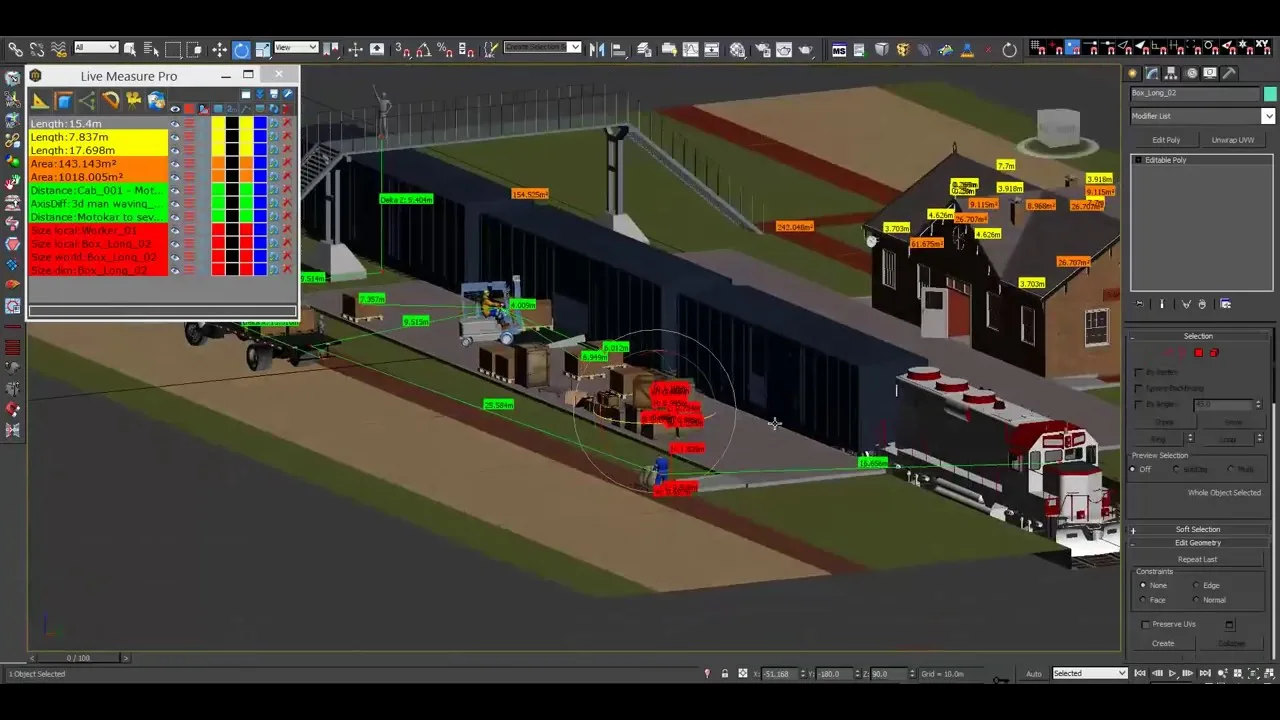
miauu's Live Measure Pro is a 3ds Max script for measuring scene elements and keeping dimensions visible while you work. The developer lists distances, areas, lengths, angles, sizes, axis difference, volumes, radius and diameter. Each measurement can be controlled separately, with user-defined colors and captions.
Control measurements in the viewport
Choose manual updates or real-time updates for each measurement. You can add a custom note, display custom text in the viewport and use color-coded labels that face the viewport or camera. The script also has a resizable mini interface for its controls.
Save and load the measurements with the scene, or export them to a .txt file. AnyPlugins also describes writing measurements into an object's User Defined Properties.
Check the display limits and compatibility
Viewport measurements cannot be rendered. The developer also notes that some special signs, including square and cubic units and angle symbols, may not display correctly in exported text. The script works best with the Nitrous display driver, available in 3ds Max 2012 and later. For 3ds Max 2009 through 2011, the developer reports possible viewport flicker; the 2012 release does not support Pixels on Screen measurements.
Compatibility listings conflict. The AnyPlugins listing says 3ds Max and 3ds Max Design 2013–2026, while the developer's page says 2009–2021. Confirm support for your exact release with miauu before purchasing.
Listings also disagree on price: the developer's page lists a €6.00 purchase, while AnyPlugins labels the script free. Check the developer's current purchase terms before relying on either listing.