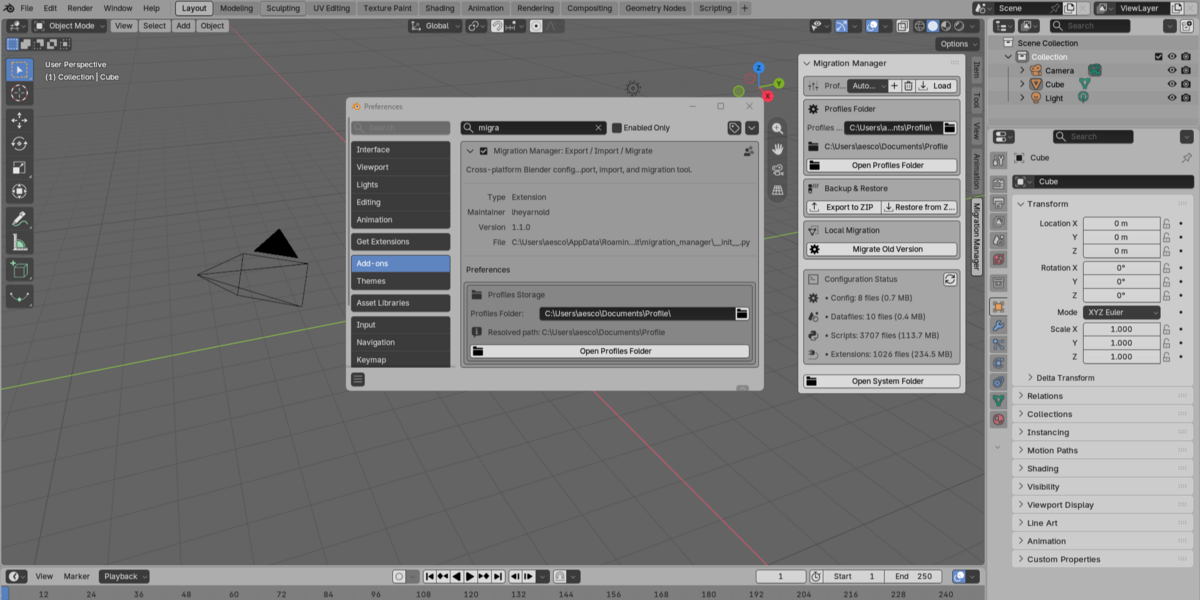
Migration Manager is a Blender add-on for carrying a setup between Blender versions or computers. It packages user preferences, custom themes, keymaps, scripts and add-ons, along with datafiles such as matcaps, brushes and fonts. You can export a ZIP backup to restore on another installation, or migrate directly from an older Blender version installed on the same computer.
Back up and restore a Blender setup
- Download the add-on ZIP. In Blender, open Edit > Preferences > Extensions, open the arrow menu, choose Install from Disk, select the ZIP and enable the add-on.
- In the 3D Viewport, press N to open the Sidebar, then select the Config tab.
- Under Backup & Restore, choose Export to ZIP to save the setup.
- On the destination installation or computer, install and enable the add-on, then choose Restore from ZIP.
If the older Blender version is installed on the same computer, the Migrate Old Version option can pull its configuration directly without a manual backup file. See the Migration Manager documentation for the installation and migration instructions.
Compatibility and license
The Superhive listing marks Migration Manager as Blender Extension compatible, identifies it as an add-on, and lists Blender versions 4.2 through 5.2. It is released under the GPL. Check the current product listing for compatibility details before installing on a different Blender version.