Multibevel is a Blender add-on for assigning different bevel settings to selected parts of a mesh. It saves edge selections as named layers, creates custom edge attributes, and assigns them to Blender’s Bevel Modifier under Weight. Each layer can be adjusted separately, so you can revisit and edit bevels without rebuilding every selection.
Organize bevels by edge layer
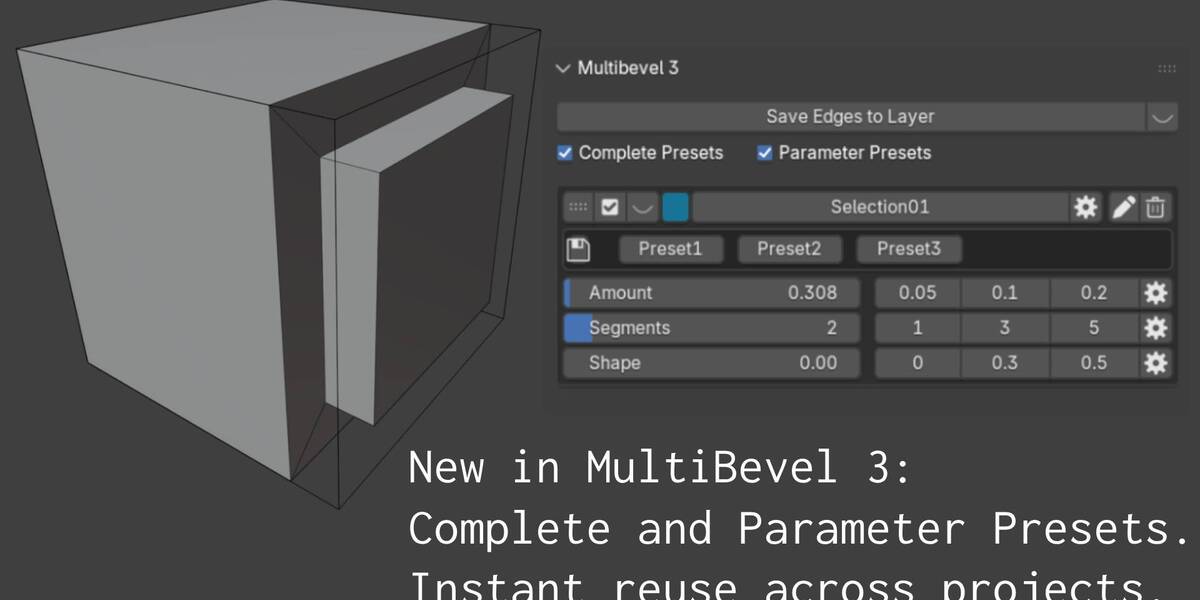
Create a layer from selected edges, then manage its bevel amount, segments, and shape from the add-on panel. You can rename, reorder, show or hide a layer’s edge preview, and enable or disable its bevel modifier. Multibevel also marks shared vertices and overlapping edges in the viewport to help you inspect selections across layers.
Edit and inspect edges in the viewport
Visual Editing Mode lets you add or remove edges by clicking them in the 3D view. In version 3.1, clicking an edge already added to a layer toggles it off. Depth-aware selection uses a surface raycast to avoid selecting edges hidden behind the mesh, with a fallback for silhouette edges. Layer colors can be changed with Blender’s color picker and update in the viewport as you work.
Reuse bevel settings
Complete Presets save a full bevel setup, including settings such as amount, segments, profile shape, and layer-specific parameters. They are available across models in the scene. Parameter Presets store up to three values for each parameter and are saved with the Blender file. You can turn either preset system off if you prefer a simpler panel. Multibevel 3 also adds a per-layer Shape Slider and direct access to the Profile control.
Compatibility and setup
The Superhive listing identifies Multibevel as a Blender extension-compatible add-on and displays Blender versions 4.3–5.2. Its documentation says Blender 4.3.0 or higher and mesh objects are required; it also says the add-on works in Edit and Object Mode. Since the displayed version range and documentation wording differ, check compatibility for your Blender version on the product listing before installing. The documentation describes installing the downloaded ZIP through Blender Preferences, then opening the panel in the 3D View N-Panel.
Multibevel is aimed at Blender modelers who maintain several distinct bevel selections on a mesh and expect to adjust them later. AnyPlugins lists it as free, while the supplied Superhive details list a GPL license but do not show a price. Check the current listing for download and license terms.