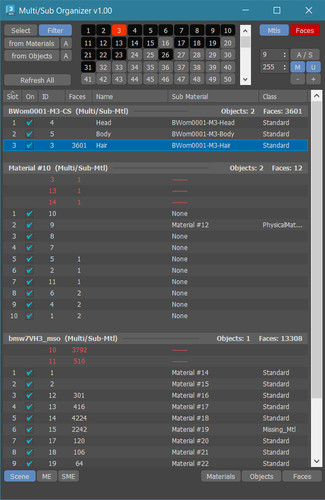
MultiSub Organizer is a 3ds Max utility for organizing large Multi/Sub-Object materials and the Face IDs linked to them in EditPoly or EditMesh. It can change a material ID and its assigned face IDs together, and brings sorting, selection and assignment checks into one list.
Keep material IDs and face assignments aligned
Choose an item in the material list and press an ID number button to assign a new ID. The Mtls and Faces checkboxes control whether changes apply to Multi/Sub-Object materials, object Face IDs or both. Updating both lets you keep the material slots and the geometry assignments in sync while reorganizing a scene.
Sort and filter the material list
Sort entries by Slot, ID, Name, Material Name or Material Class. You can filter or select materials based on the current object selection or on materials active in the Material Editor. To change the material's order to match the list, sort the list and choose “Apply sort to material” from its right-click menu.
Inspect assignments and select faces
The list reports face counts for each ID and object counts for each material. Unassigned Face IDs are highlighted in red, which helps locate assignment gaps while reviewing a scene. Use the Faces button to select faces by ID; the tool can also find objects linked to a material.
Use multiple materials with care
MultiSub Organizer can show several Multi/Sub-Object materials at once. Pixamoon recommends working with one material at a time when applying new IDs. The ID buttons indicate IDs used by the currently active Multi/Sub-Object material, so check which material is active before assigning an ID.
Check the license terms
The Pixamoon product page displays a price of $12.00 and lists commercial and personal licenses; the personal license is 20% off with code "Personal-Use-Only" and can be purchased once per user. Each license activates on one PC, and Pixamoon says activation details arrive by automated email after purchase. Check the Pixamoon product page for the current price and terms.