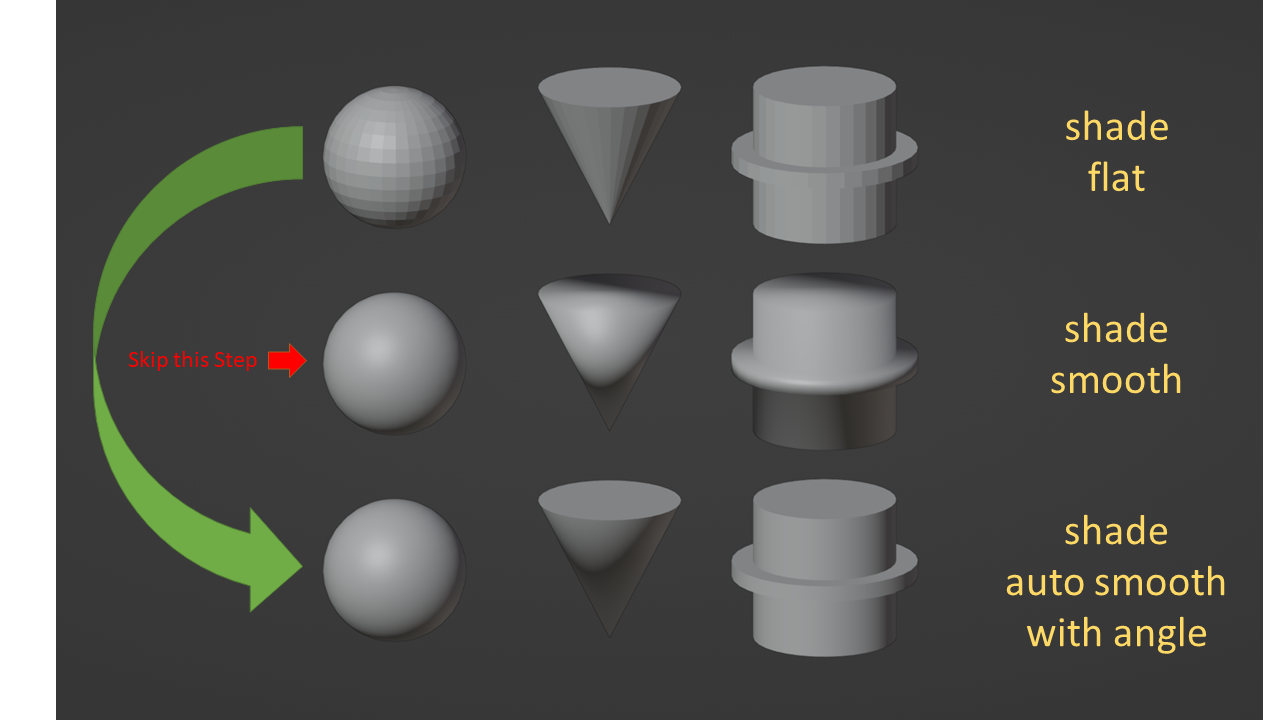
Mysmooth is a Blender add-on that applies auto smooth from a header menu button or the Ctrl+Alt+S shortcut, without opening mesh properties each time. Its default smoothing angle is 30 degrees, which the developer describes as useful when you want smooth shading while retaining some sharp edges.
Run smooth or flat from the header
The button indicates the object's current shading condition. Use it to switch between smooth and flat shading. Mysmooth can process multiple selected objects together; when a selection contains mixed object types, the listing says it prompts you to choose whether to smooth or flatten them.
Adjust the angle and shortcut
A nearby submenu lets you activate or deactivate auto smooth on the active object and adjust the smoothing angle. You can also use the button as a direct smooth-and-flat toggle. The shortcut and some default values are configurable in the add-on preferences.
Mode and compatibility
The button is available in Object Mode, and the operation is documented for objects that contain a mesh. The published listing names Blender 3.0, 3.1, and 3.2 and specifies a GPL license. For a Blender version outside that list, check the developer's listing for compatibility details. The documentation describes the controls, and the product FAQ covers common button and shortcut issues.