Node To Talk is a Blender add-on for turning Geometry Nodes, Shader Nodes, and Compositor node trees into structured text reports and high-resolution captures. The reports map connections, settings, and execution order, giving an AI assistant readable context when you document a graph or ask about a particular setup.
Explain node trees in text
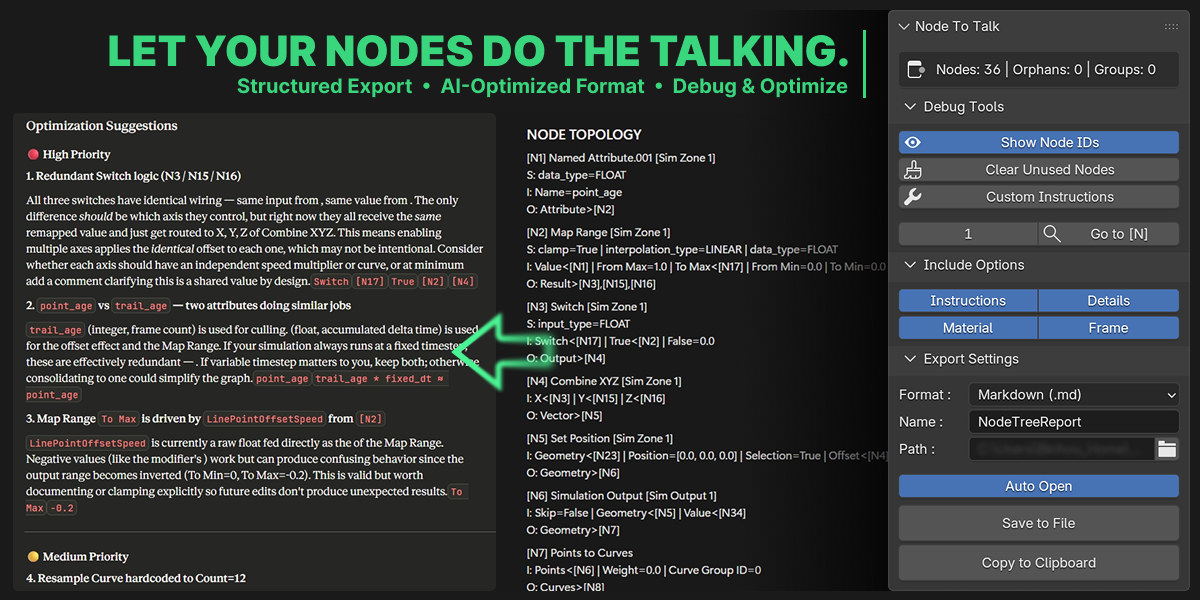
In the Node To Talk tab of the Node Editor's N panel, you can export a complete tree or limit the report to selected nodes. The Include Options let you add instructions, details, frame information, or material data. Details can include tree statistics, exposed group inputs and outputs, and active modifier values. Including material information can help explain Geometry Nodes behavior, though it increases token use.
Reports can be copied to the clipboard or saved as Markdown or plain text. The documentation recommends saving larger reports to a file to reduce the risk of clipboard content being truncated in an AI chat. Editable instruction files let you adjust how the report guides an assistant.
For debugging, Show Node IDs labels nodes with IDs that match the report, and Go To [N] jumps to a numbered node. Enable Show Node IDs before exporting: IDs can shift when nodes are added, deleted, or duplicated while the overlay is off. The add-on does not overwrite node names.
Capture node trees as tiled images
Node To Capture places a grid overlay in the editor so you can see the area being captured. Set Min Grid or Fit Current Grid adjusts the frame around a node layout, while selection-aware AutoFit can focus on selected nodes. Subdivide Grid adds tiles to increase the capture resolution.
Merge Tiles combines the result into one image; with it disabled, each tile is saved separately. Choose PNG, JPG, or WEBP. The documentation recommends separate tiles when a merged image is larger than 2000 by 2000 pixels, since an AI service may compress a large image and lose detail.
When Node To Talk is useful
The text export can provide a logical account of a node setup for documentation, modular group work, or debugging. Captures add a visual view of the graph when its layout matters. The developer's Node To Talk documentation covers installation and the panel options.
For a first export, the documentation suggests enabling all Include Options. On follow-up questions, you can disable Instructions to save tokens and turn off Details once the assistant has the needed parameter context. The Clear Unused Nodes command removes disconnected orphan nodes from the current tree, so use it when you intend to remove them.