NodeGenius is a Blender add-on for applying Geometry Nodes presets, reading existing node trees in plain English, and checking trees for selected issues. Its current v1.1.0 documentation also describes optional text-to-nodes generation through a language model running on your own computer. The preset, explanation, and check features work offline.
Apply a preset to a mesh
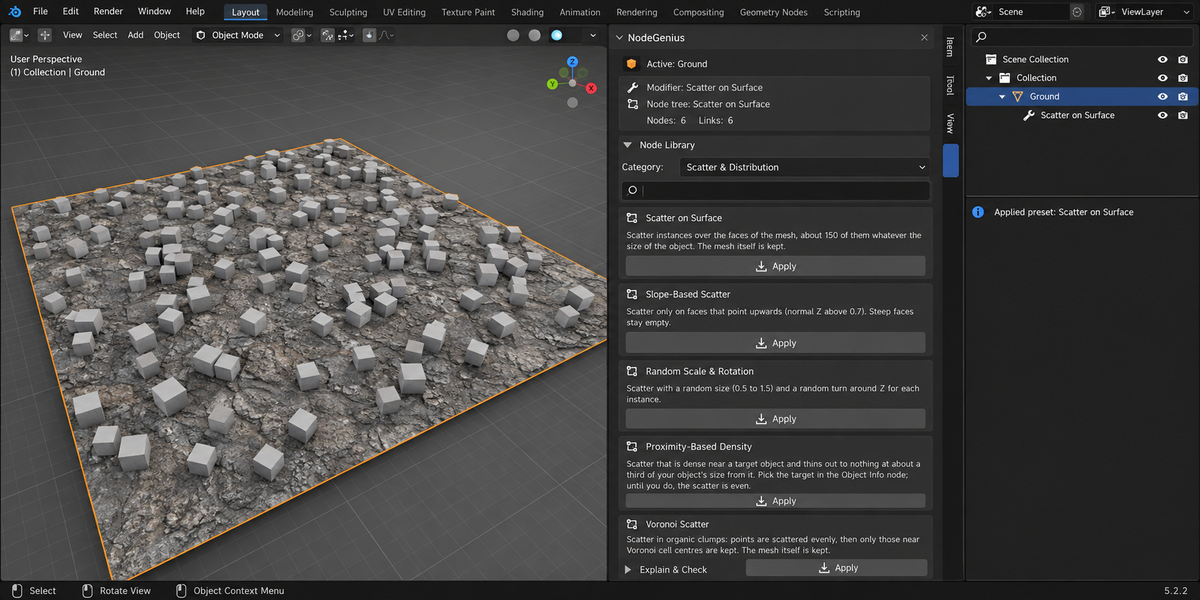
The Node Library includes ten presets: Scatter on Surface, Slope-Based Scatter, Random Scale & Rotation, Proximity-Based Density, Voronoi Scatter, Noise Displacement, Array Grid, Boolean Cutter, Height Gradient Color, and Edge Wireframe. Applying one to a mesh object that is local to the file adds a Geometry Nodes modifier to the active object; make a linked object local first. It leaves existing modifiers in place, and one Undo removes the added modifier. Scatter presets keep the original mesh and add instances to it. If a preset cannot be built completely in your Blender version, nothing is added and the status bar says why.
Preset settings are sized to the object when you apply them, using its surface area and bounding box after its existing modifiers. Scatter presets add small placeholder cubes so the distribution is visible. Replace the placeholder with your own asset through an Object Info node. Some presets need extra setup: choose a target object for Proximity-Based Density; otherwise, the scatter stays even. Choose a cutter for Boolean Cutter; without one, nothing is cut. Subdivide a flat mesh before using Noise Displacement, which moves existing vertices.
Explain and check node trees
Explain Tree reads the active Geometry Nodes modifier and describes its nodes in data-flow order, including values and connections. It lists nodes that do not reach the Group Output separately. Explain Node gives the same kind of description for the node you last clicked in the Geometry Nodes editor. The explainer has built-in notes for about ninety common nodes; other nodes are still listed with their names, values, and inputs.
Check Tree reports selected issues, including nodes without connected outputs, instance operations placed after Realize Instances that have no effect, subdivision levels above four, and very large trees. It does not change the graph. The documentation says it lists the first thirty issues and counts additional issues by kind.
Optional text-to-nodes generation runs locally
In v1.1.0, text-to-nodes is optional and off by default. It works with a language model running locally through Ollama or LM Studio. The Local URL must be localhost, a 127.x.x.x address, or ::1; the add-on checks the resolved address, connects to that verified local address, and does not follow redirects. Before sending, a dialog shows the prompt or node-tree details that will be sent; approval can be remembered for that address and type of data. The feature needs no account or API key. The documentation lists what each request sends.
Generated trees depend on the local model. NodeGenius skips nodes that are unavailable in your Blender installation and reports skipped nodes and links. If the resulting graph cannot reach Group Output, nothing is added. NodeGenius refuses generated trees containing nodes whose size cannot be estimated in advance, including volumes, file imports, repeat or simulation zones, grids, and text nodes that can grow without limit. It also refuses nodes that can take minutes, such as UV Unwrap and Pack UV Islands. It limits geometry-multiplying values, caps each scatter at about 5,000 points, and refuses trees that could add more than two million vertices or points or whose size cannot be worked out. Trees estimated to take more than about 40 seconds are refused without a test. Trees estimated to take under four seconds even on a computer six times slower than the one used for the estimate skip the test; other trees are tested once in a second background Blender process. The test stops after three seconds, and a tree is added only if it finishes in time. If Blender cannot start that second process, NodeGenius adds a tree estimated under four seconds on the fast reference computer with a warning; it refuses other trees. The estimate and test can differ from the time in your working Blender, so a near-limit tree may be refused or occasionally pass. Blender does not respond while the test runs. For a predictable starting point, use a preset.
Version 1.0.0 used online AI backends. The v1.1.0 documentation and marketplace FAQ say those backends were removed; prompt-based generation now uses a local model. On first startup after updating, v1.1.0 deletes the key saved by version 1.0.0.
Compatibility and installation
The current documentation lists Blender 4.2 LTS and later, tested on 4.2 and 5.2, while the marketplace details show Blender 4.2–5.2. It runs on Windows, macOS, and Linux. To install, keep the downloaded archive zipped, choose Edit → Preferences → Add-ons → Install from Disk, select the archive, and enable NodeGenius. Press N in the 3D Viewport to open its sidebar tab. The add-on is licensed under GPL-3.0-or-later. See the product listing for marketplace details.