Parametrizer is a Blender add-on for changing mesh geometry with adjustable parameters. Set up controls for a mesh’s sizes and ratios, then change the geometry by sliding parameter fields in the add-on’s main panel. The parameters stay with the mesh when you append it to another scene.
Set up mesh parameters
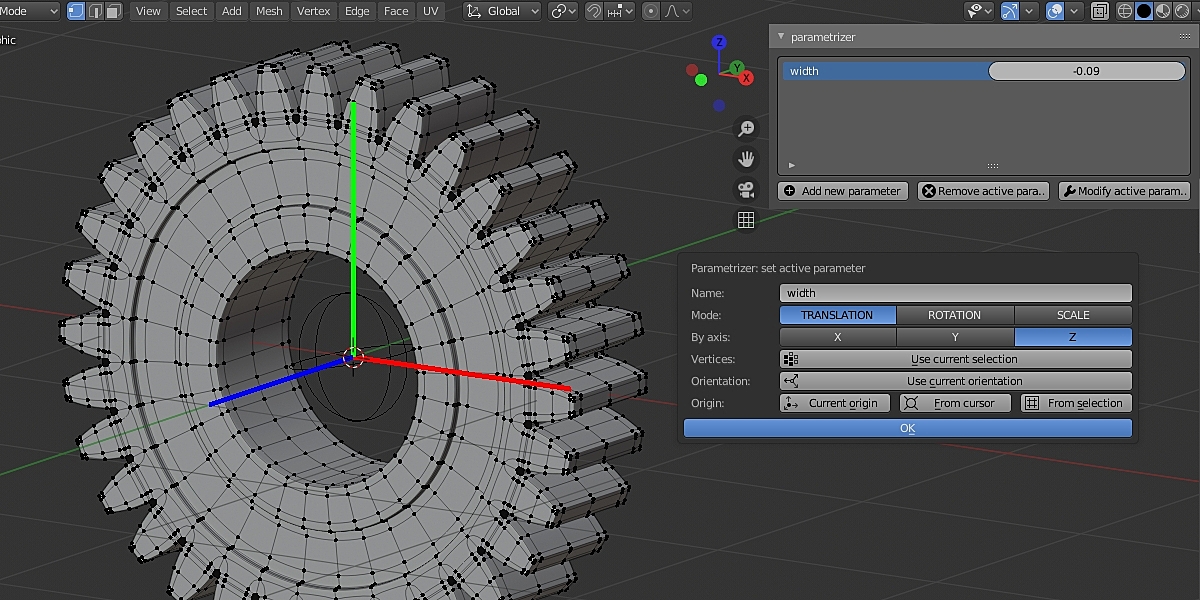
For each parameter, enter a name and choose a mode: TRANSLATION for moving, ROTATION for rotation or SCALE for scaling. Select the axes it affects and whether it applies to selected vertices. You can also set the transformation’s orientation and origin. After confirming the setup, adjust the mesh with the parameter’s slider. Use the Modify active parameter and Remove active parameter controls to edit or remove an existing one.
Choose the orientation and origin
While creating or editing a parameter, an orientation widget displays three colored axes for its coordinate system. Transformations follow that orientation. Use the current visible axes to set the orientation, and place the widget at the mesh origin, the cursor or the center of the active selection.
Reuse parameters in other scenes
Parametrizer saves parameters with the mesh, so they come along when you append that mesh to another scene. This lets you keep objects in a library and adjust their geometry later. The version history says version 1.1.0 added slider animation through the Timeline; see the version notes.
Panel location and Blender versions
Find the add-on in the 3D Viewport window’s N-panel, under the Parametrizer tab. The product listing names Blender 2.80, 2.81, 2.82, 2.83 and 2.90. The documentation says the add-on is for Blender 2.8 and 2.9; earlier versions are not supported. It does not confirm support for later releases, so check compatibility before installing in a newer Blender version.