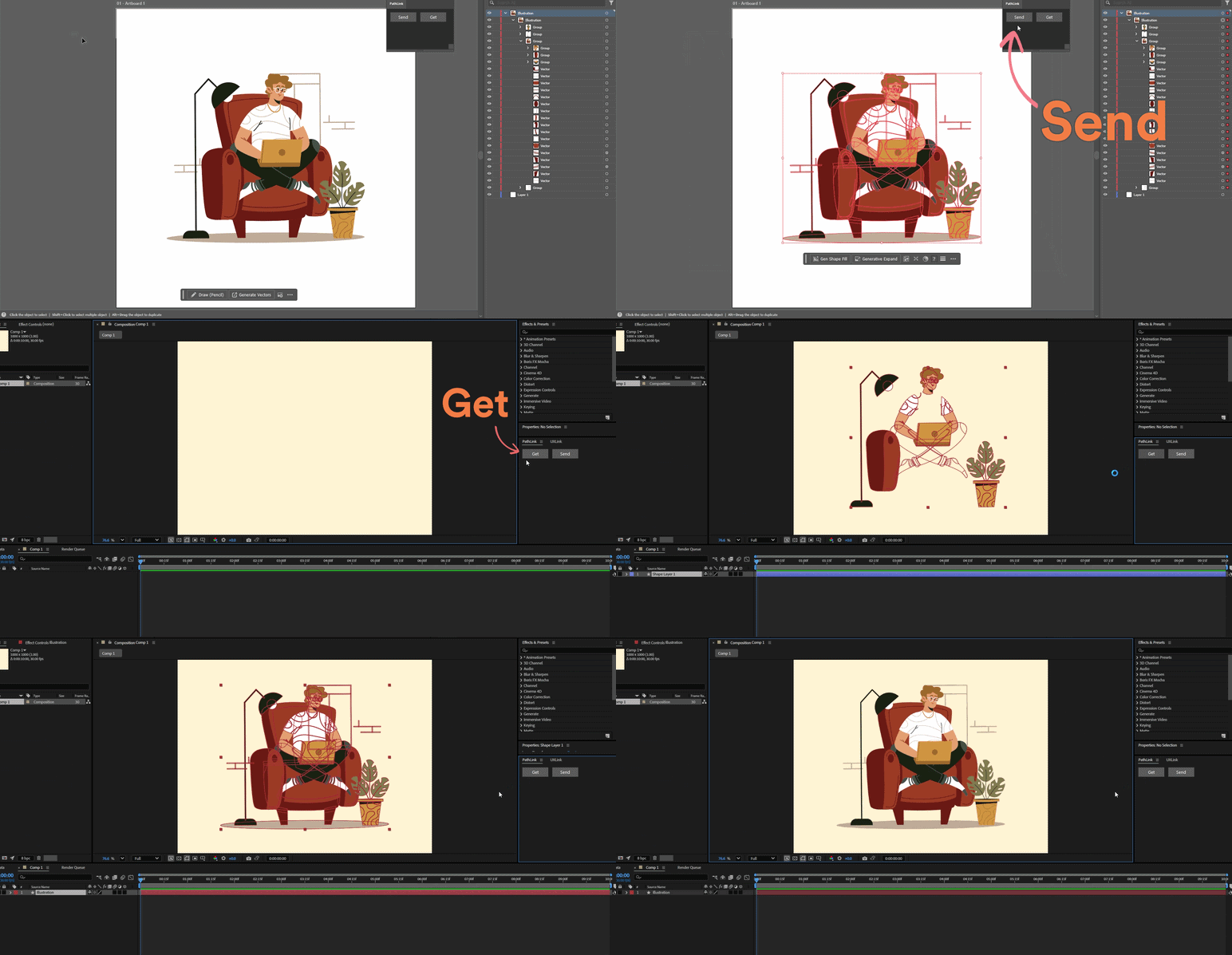
PathLink by Maher Wali transfers designs between Illustrator and After Effects. On the Illustrator-to-After Effects route, vector paths become editable shape layers while groups, text, images, masks, fills, gradients and blend modes move with the artwork. The reverse route sends After Effects artwork back to Illustrator as editable objects with nested organization. This two-way handoff suits illustrators and motion designers who need to refine the same design in both applications.
Sending Illustrator artwork into After Effects
PathLink transfers rectangles, ellipses, stars, polygons, Bézier curves and compound paths as editable After Effects shape layers. It also carries nested group structures and clipping masks, which become track mattes. Text transfers as editable layers, including font, color and size properties, multi-style text runs and text on a path. Text on a path requires Illustrator 29.7.1 or newer.
Image layers transfer as placed images with their transforms preserved. If an image has no linked file, PathLink stores it in an assets folder beside the After Effects project. Solid fills, linear and radial gradients with up to five color stops, and layer blend modes also transfer. Supported Illustrator effects include Drop Shadow, Gaussian Blur and Feather.
Sending After Effects artwork back to Illustrator
PathLink converts shapes and paths into Illustrator vector paths, text layers into editable text objects, and images into placed images. After Effects precomps become nested Illustrator groups. Track mattes and in-layer masks become clipping masks; drop shadows and layer blurs are recreated as native Illustrator effects. Gradients transfer on this route as well.
How PathLink organizes layers
PathLink maps Illustrator groups into After Effects layers according to their structure. Loose paths and simple shapes are usually merged into one shape layer. Groups with five or fewer children are parented to a guide null. Groups with more than five children usually become a single shape layer, but fall back to a guide null if merging would break stacking order; nested groups and groups that resolve to more than eight layers become precomps. Clipping groups use track mattes, which take priority over the other rules. Loose paths and simple shapes split into separate layers when one has an effect its siblings lack or merging would break stacking order.
Transferred layers start at the current time indicator. The developer’s version history includes version 1.6.8, dated September 7, 2026, and lists compatibility with After Effects 2026 and 2025 and Illustrator 2026 and 2025. Version 1.6.1 added clipping masks, text on a path, compound paths and the listed effects. Check the PathLink product page on aescripts for current release and compatibility details.