PDF as Reference is a Blender add-on for importing PDF files as reference images in a 3D workspace. It can bring in multiple PDFs at once, placing each on its own plane. The product listing says each import retains its original quality and receives a unique material. The add-on is aimed at artists and designers who want PDF references inside Blender without manually converting them first.
Use PDFs as scene references
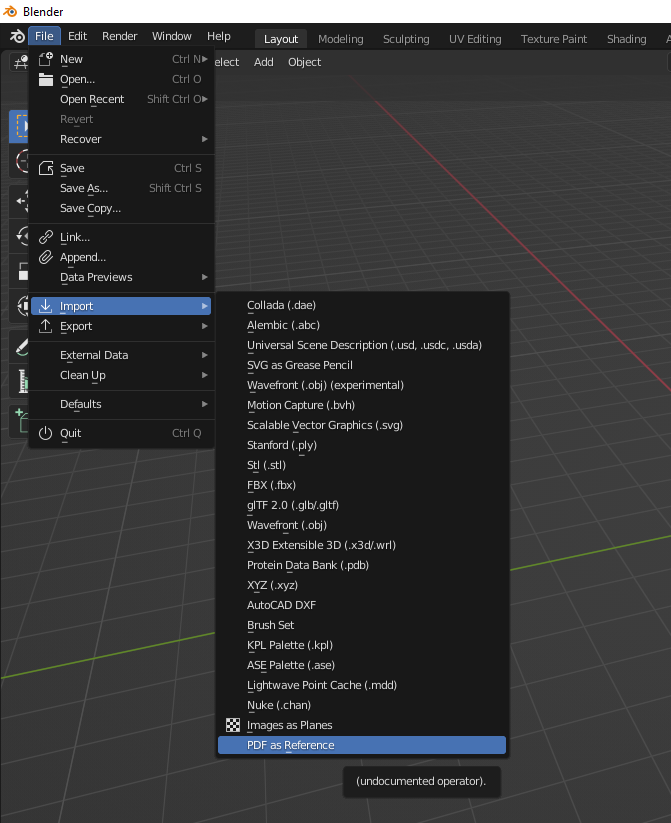
The add-on works through Blender’s existing import menu.
PyMuPDF setup
The add-on uses PyMuPDF. Its product page says an automated installation process is included, but the setup instructions say users still need to install PyMuPDF manually. They direct users to Blender’s Scripting workspace, to bootstrap pip through the Python Console if needed, run the provided PyMuPDF installer script in the Text Editor, then restart Blender and enable the add-on. The installation documentation page points users to the product description and a linked installation video.
Compatibility and license
Superhive lists Blender 2.8, 2.81, 2.82, 2.83, 2.9, 2.91, 2.92, 2.93, versions 3.0 through 3.6, and 4.0 and 4.1. The listing notes an update for Blender 4.0 and 4.1. Check the current product listing for compatibility with your release. The listing identifies the add-on as GPL-licensed.