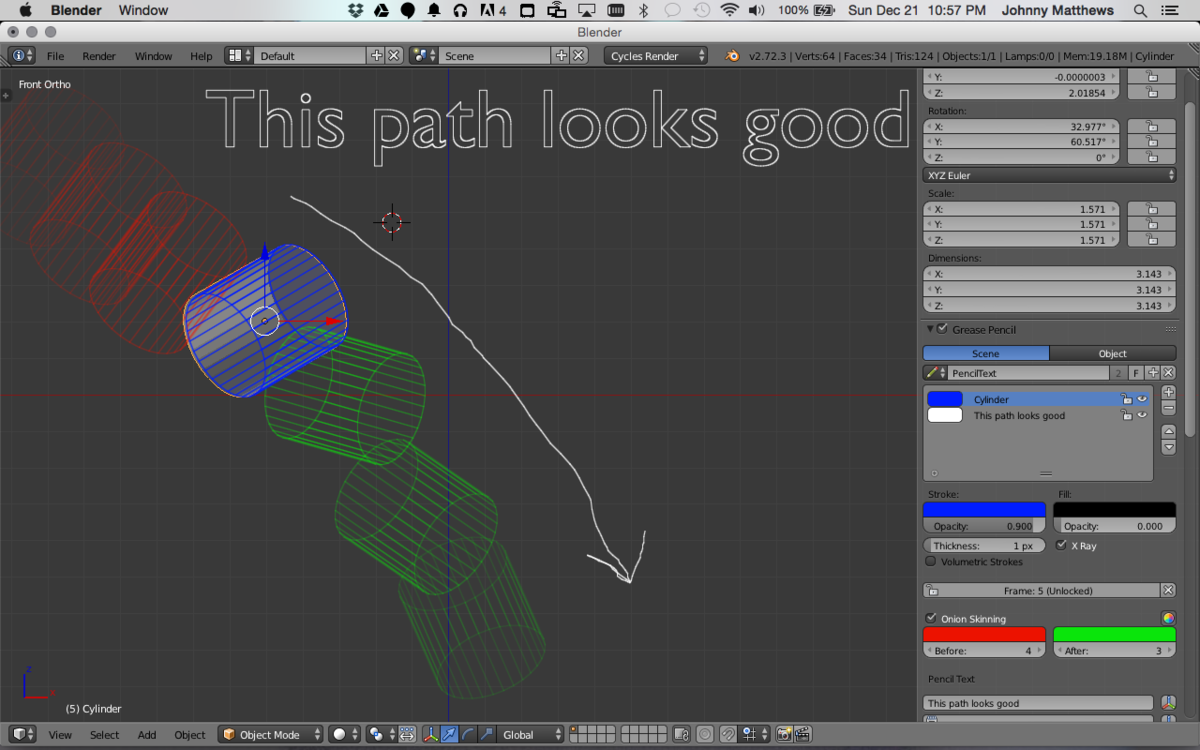
PencilText is a Blender add-on for adding notes and object outlines to a scene with Grease Pencil. It converts typed text into editable Grease Pencil strokes and can trace the edges of a selected object into strokes in the 3D viewport.
Add text at the 3D cursor
Enter text in the add-on panel, choose its initial color and size, then click the button beside the text field. For a longer passage, create a text block in Blender's text editor, return to the 3D viewport, select that block in PencilText, set the color and size, and insert it. The resulting strokes can be edited with Blender's Grease Pencil tools.
Trace a selected object's edges
Select an object in the 3D window, choose a Grease Pencil color, and click the button beside “Object to Grease.” PencilText traces the object's edges into Grease Pencil strokes, giving you an outline to use in scene notes or movement mockups.
Check compatibility before installing
The Superhive product listing labels the Blender version as 2.7x, and its documentation specifies Blender 2.73 as the requirement. The supplied sources do not confirm compatibility with newer Blender releases, so check the creator's listing before installing it in a newer version. The product listing identifies the license as GPL.
The documented installation steps use Blender 2.73's File menu, User Preferences, and Addons panel: install the downloaded file, enable the add-on, then save the user settings. Menu names may differ in other Blender versions.