Pickup Tool is a Blender add-on for animating object pickup, carrying, and release. It brings target selection, pickup and drop controls, and animation baking into one panel. The product listing describes it as a way to handle these interactions without manually setting up constraints, parenting, and baking.
Set up a pickup and drop
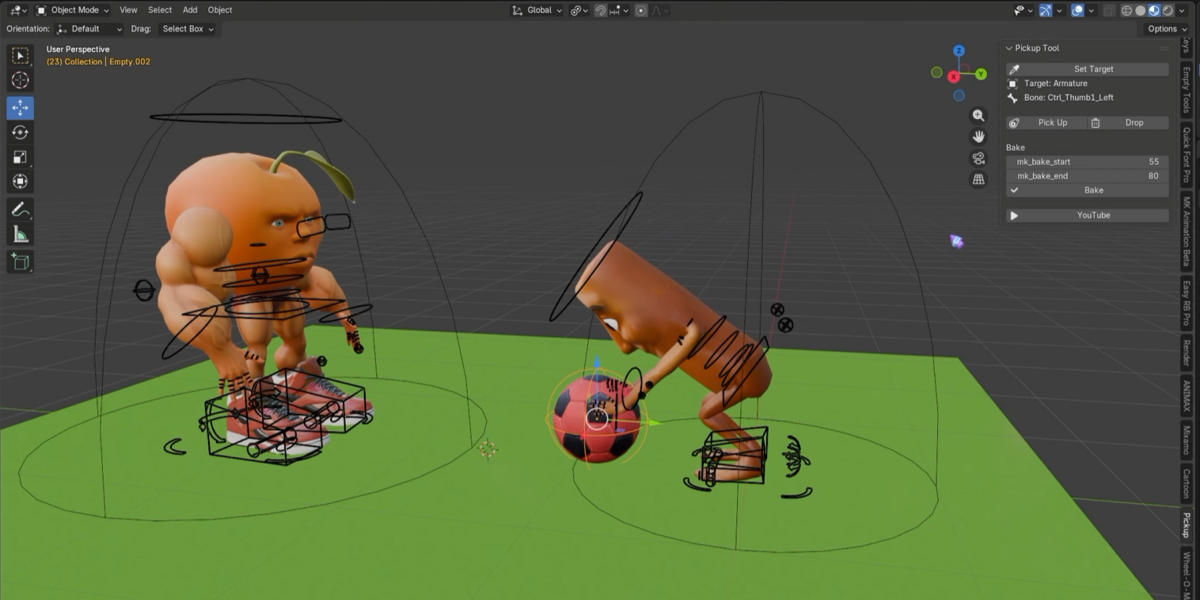
- Select the object involved in the interaction, then click Set Target. The panel displays the current target.
- Click Pick Up to attach the object, then animate the interaction in Blender.
- Move the timeline to the release point and click Drop.
- Set the bake start and end frames to cover the motion, then click Bake.
This sequence suits prop actions such as picking up a box, carrying a tool, releasing a weapon, or placing a collectible. The listed use cases also include furniture and other interactive objects.
What baking changes
Bake converts the pickup and drop motion into keyframes. The resulting animation remains editable, and the product documentation describes the baked motion as ready for export. A custom frame range lets you choose which part of the timeline to bake, which is useful when a scene contains animation beyond the object interaction.
Pickup Tool is for animators and content creators who animate props. See the Pickup Tool documentation for installation and panel instructions.
Compatibility and license
The product details list Blender 3.6 through 5.1, mark Blender Extension compatibility as Yes, and specify the GPL license. They also list Cycles and Eevee as supported render engines. Check the current product listing for compatibility details if you use a Blender version outside the stated range.