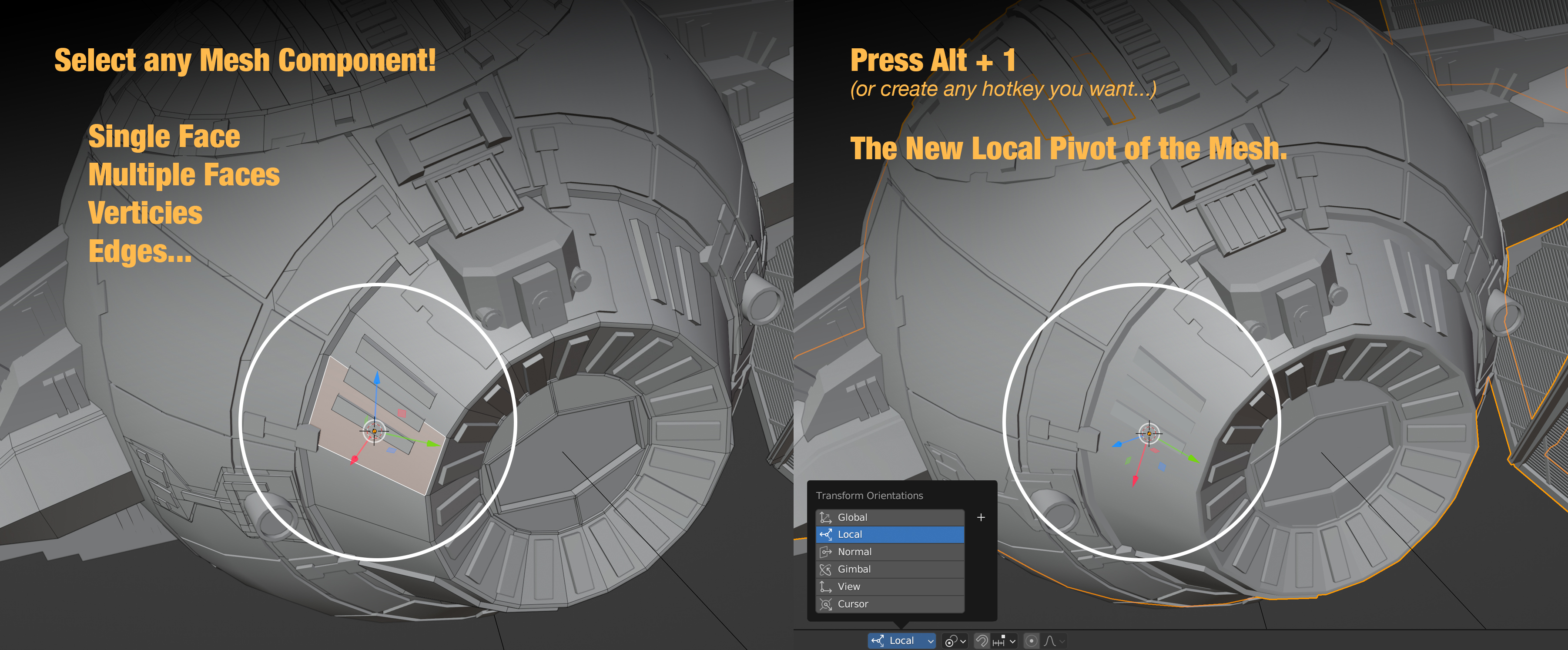
Pivot Master is a Blender add-on by HELLO GIANT that re-assigns a mesh's Local Origin to a selected component. Use it in Edit Mode when you want to place the origin from mesh geometry. The product listing names a single face, multiple faces, vertices, and edges; its documentation also confirms that multiple vertices can be selected.
Set the origin from a mesh selection
Select a component, then run Pivot Master from Blender's Mesh menu or use its default Alt+1 hotkey. The documentation says a component must be selected for the tool to work. You can change the hotkey to suit your setup.
The listing also names Blender 3.6 and 4.0 as compatible versions. It does not state compatibility with other Blender releases. The add-on is distributed under the GPL license.
Install and enable the add-on
- Download the Pivot Master add-on file for a Blender version listed as compatible.
- In Blender, open Preferences and choose Add-ons.
- Click Install, browse to the saved add-on file, and select it.
- Enable the add-on using its checkbox. Keep the default Alt+1 shortcut or assign a different hotkey.
After enabling it, enter Edit Mode, select a face, vertex, or edge, and run the tool from the Mesh menu or hotkey. See the Pivot Master documentation for the listed installation steps, or check the product listing for current compatibility details.