Plumebus is an After Effects plugin for live 3D smoke simulation inside a composition, with fire available in Pro. Its GPU smoke simulation draws into the comp as you work, so you can scrub the timeline and see the smoke follow without caching, exporting or round-tripping through another application. It suits motion designers and compositors who want simulations to respond to elements already in an AE shot. See the Plumebus product page for current edition details and compatibility.
Build simulations around comp layers
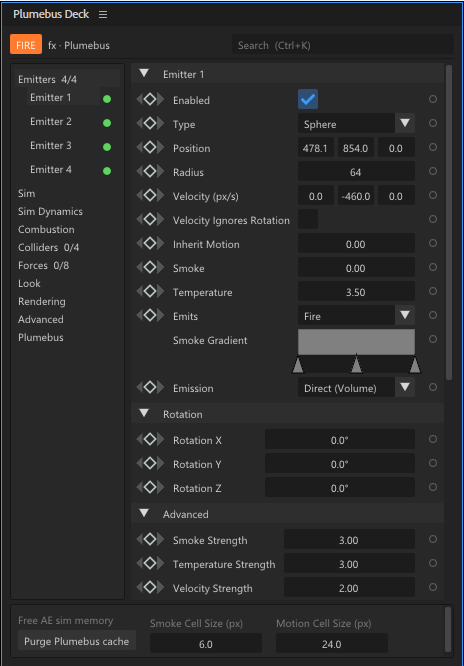
Text, shape layers, solids and 3D meshes can act as emitters. When an emitting layer moves, its emission moves with it. One simulation supports up to four emitters, each with its own position, color and settings. Forces shape the effect, while layers and 3D geometry can act as colliders that redirect the smoke. Plumebus also uses After Effects lights and camera to light and view the volume through the composition.
The dockable Plumebus Deck opens from Window > Plumebus Deck. It puts emitters, forces and colliders in a sidebar, with curve and gradient editors and search. The Deck edits the same effect values as Effect Controls, so keyframes and expressions continue to work. Controls that do not apply to the current mode are greyed out in both panels. For blocking out a shot, the separate Realtime Editor provides a full-speed view of the simulation.
Start with a preset and edit its values
Plumebus has twelve presets. Smoke Column, Cigarette Smoke and Smoke (Default) work with every license. Plumebus Pro adds nine presets for fire, combustion and explosions, including Gas Explosion, Bonfire, Torch and Blue Flame. Choose a preset from the effect menu or drag an .ffx file from Effects & Presets. The values set by a preset remain editable.
Compare Standard and Pro
Standard includes GPU smoke simulation, emitters, forces, colliders, After Effects lights and camera, the Plumebus Deck, the Realtime Editor and three smoke presets. Pro includes those features and adds fire, combustion, explosions, particles and bursts, VDB playback, and a path-traced renderer with tonemapping. The free trial unlocks all features, including Pro, and adds a watermark to renders.
The listed prices were $129 for Standard and $349 for Pro, with a 25% checkout discount shown on November 22, 2026. Check the developer's listing for current prices before purchase.
Check host and computer requirements
The developer names After Effects 2022 or later as the host requirement and Media Encoder for renders. Its compatibility table lists After Effects and Media Encoder versions from 2022 through 2027. Windows requires Windows 10 or 11, 64-bit, and a DirectX 12 GPU. The macOS requirement is Apple Silicon, M1 or later.