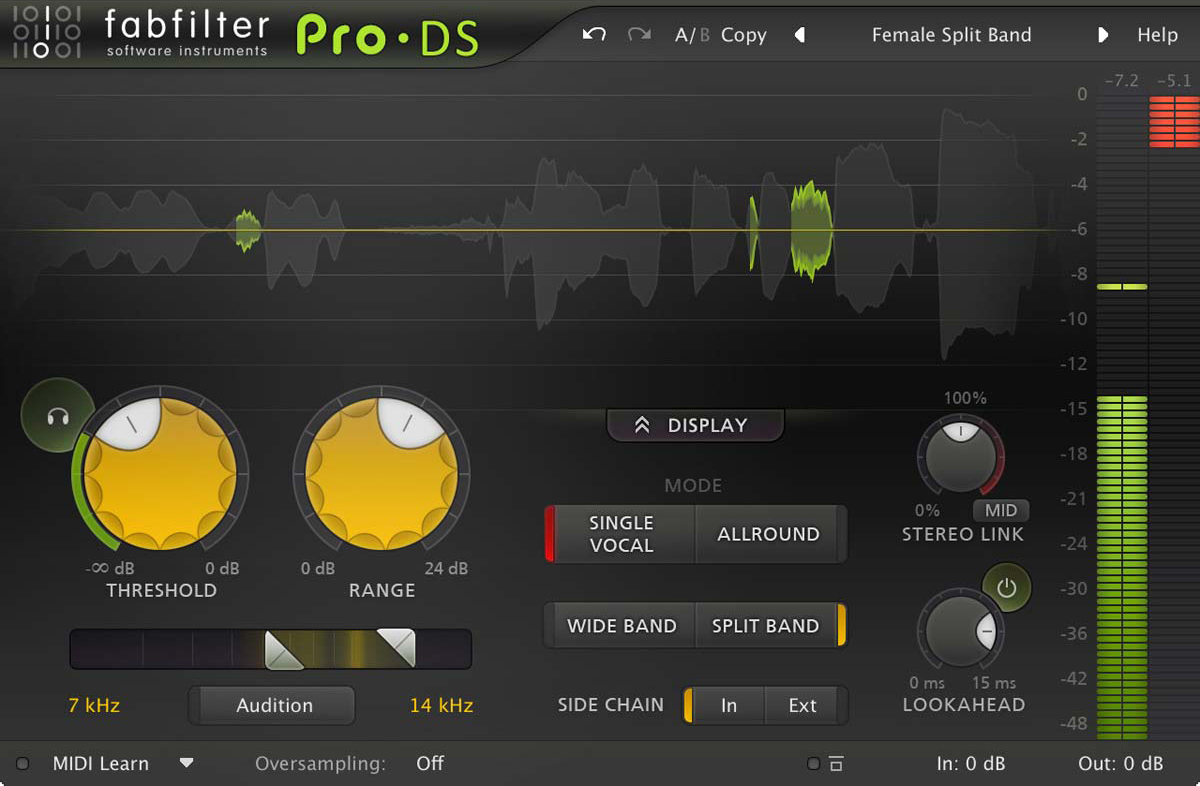
FabFilter Pro-DS reduces sibilance in vocal recordings, including peaks made more prominent by compression, saturation or limiting. In Allround mode, it can also limit high frequencies on material such as drums or full mixes.
Choose how Pro-DS detects sibilance
Single Vocal mode uses a detection algorithm designed to distinguish vocal sibilance from other sounds in a single vocal track. Allround mode detects according to the selected side-chain frequency range and threshold, making it suitable for other sources and full mixes.
Control what gets reduced
Threshold sets the level that triggers gain reduction, while Range scales the amount of reduction. High-pass and low-pass side-chain filters let you choose a trigger range between 2 and 20 kHz. You can audition the triggering signal and use the built-in spectrum analyzer to find the frequencies that are setting it off.
In Wide Band mode, Pro-DS lowers the overall signal level when it detects sibilance. Split Band mode attenuates only high frequencies, leaving lower frequencies untouched. Wide Band often works well on a single vocal; Split Band can suit full mixes or more complex audio. For a mastering workflow, FabFilter documents using Allround and Split Band to limit high-frequency transients, then raising that frequency range with a high-shelf EQ.
Latency and stereo options
Look-ahead can begin de-essing up to 15 ms before the signal crosses the threshold, which can help catch the start of sibilance. With look-ahead off, Wide Band selected and oversampling off, Pro-DS works without latency. Enabling look-ahead adds 15 ms, with a small additional amount when oversampling or Split Band processing is used.
The stereo version has adjustable channel linking and mid-only or side-only processing. These options can target centered vocal content while leaving stereo sides alone, or process side content while preserving mono material.
Compatibility and trial
Pro-DS is available as VST, VST3, CLAP, Audio Units, AAX Native and AudioSuite plug-ins. FabFilter lists Windows 11, 10, 8, 7 and Vista in 32-bit or 64-bit configurations, with a VST 2/3 or CLAP host or Pro Tools; macOS 10.13 or later is 64-bit only on Apple Silicon or Intel, with a VST 2/3, AU or CLAP host or Pro Tools. FabFilter offers a 30-day trial.