What the PDE add-on does
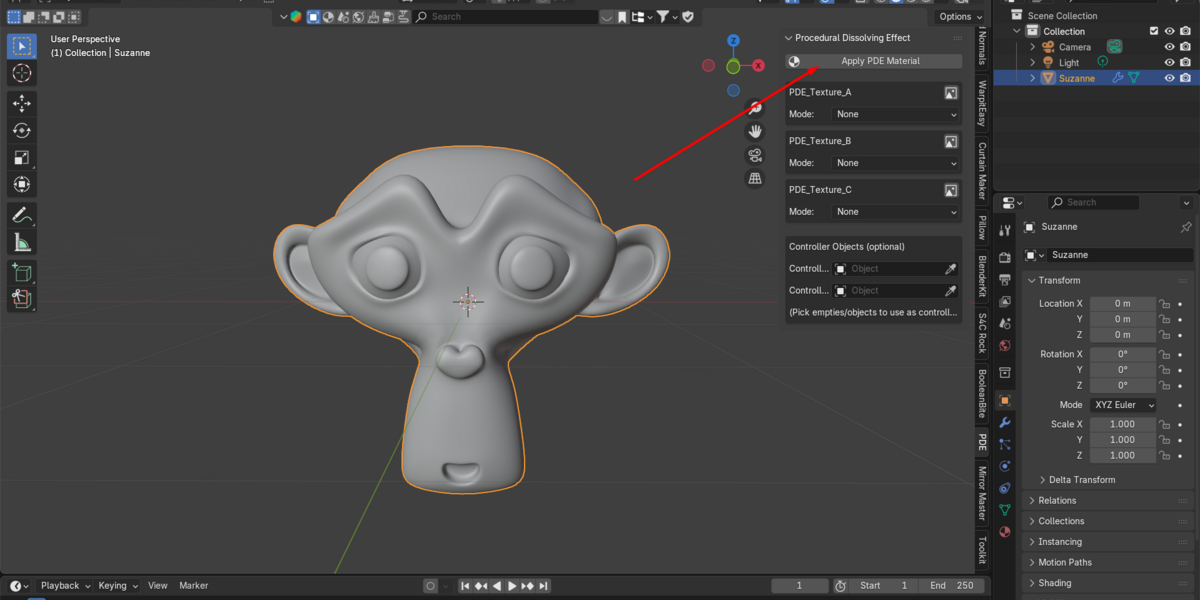
Procedural Dissolving Effect (PDE) is a Blender add-on for applying and adjusting a dissolve material on selected objects. Its one-click action appends the PDE material from assets.blend and assigns it to the selection. The controls appear in the 3D View sidebar under PDE. The creator’s Superhive listing describes the add-on and its controls.
Textures and mapping controls
The material has three sub-textures named PDE_Texture_A, PDE_Texture_B, and PDE_Texture_C. The add-on can import Base Color, Roughness, Normal, Metallic, Ambient Occlusion, and Emission maps. It detects map types from filenames and connects them to the corresponding Principled BSDF inputs.
For each texture, mapping controls include uniform scale or separate X, Y, and Z scale, rotation on all three axes, and position along X, Y, and Z. Mapping nodes use UV coordinates by preference and are named and reused to avoid creating duplicates in the node tree.
Adjusting the dissolve material
Shader controls let you set two dissolve edge colors, change their emission strengths, and adjust noise scale, detail, and roughness. A transparency control adjusts how much of the object fades. Optional controller pickers let you use empties to drive material properties through drivers.
The listing identifies Cycles and Eevee as supported render engines. This setup suits Blender artists who want to apply and tune a dissolve material through the sidebar, with texture and shader settings available in the same panel.
Blender version information
The Superhive listing reports Blender versions 4.0 through 5.0 and marks the add-on as Blender Extension compatible. The supplied listing does not confirm support for releases newer than Blender 5.0, even though the catalog product name includes “Blender 5.0+.” Check the creator’s listing for current compatibility before installing.