Product Visualizer Pro is a Blender add-on for creating product renders and turntable animations. It analyzes a selected model's dimensions, orientation, surface brightness, material properties and geometry, then uses that information to suggest camera and lighting setups. You can adjust those recommendations manually.
Model analysis and camera setup
The analysis checks the model's bounding dimensions, longest axis, position relative to the ground, vertex complexity, and metallic or transparent materials read from Principled BSDF nodes. Advanced Overrides let you set the front-facing direction or identify a product as glass or metal when automatic detection does not match your scene.
Camera options include Hero Shot, 45° Angle, Front, Top, Detail or Macro, and a custom camera based on your viewport. You can adjust framing, focal length, height, distance, depth of field and aspect ratio. The manual also describes presets for square, vertical and widescreen output.
Lighting, backgrounds and shadows
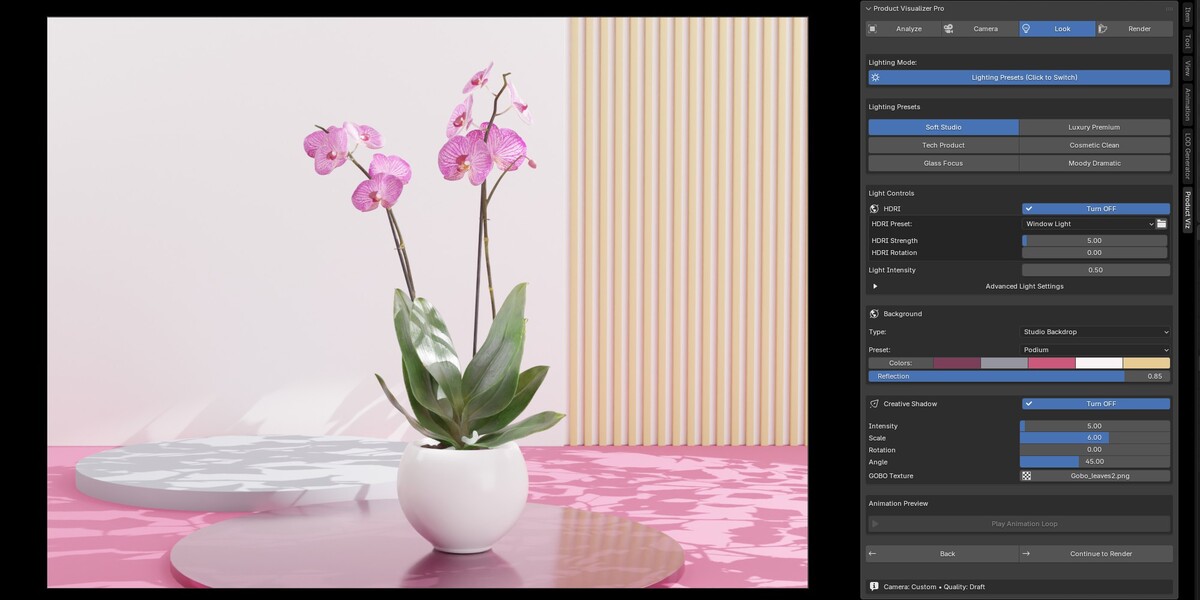
The add-on includes six physical light rigs: Soft Studio, Luxury Premium, Tech Product, Cosmetic Clean, Glass Focus and Moody Dramatic. Smart Studio uses HDRI environments, with presets such as Clean Studio, Soft Outdoor and Window Light. You can rotate the environment, adjust its strength or load your own HDRI files in .hdr or .exr format.
Backdrop options include podiums, L-curves and seamless 360-degree scenes, with customizable colors and reflection settings. The GOBO system projects patterned shadows using included textures such as windows, trees and railings. Its controls adjust shadow scale, intensity, angle and rotation.
Cycles rendering and turntable previews
Render presets named Draft, Marketing, High-End and Ultra configure Cycles quality settings. You can also use a custom quality control and adjust output resolution, samples, noise thresholds, light bounces and render mode. The manual lists PNG, JPG, EXR and MP4 output options. It notes that render time depends on the quality setting and hardware, and recommends GPU rendering for speed.
The 360-degree turntable tool builds a rotation rig for the product or camera. You can preview the animation and export it as video. The product FAQ notes that multi-frame rendering depends on using a transparent background or a 360-degree backdrop.
Compatibility, connection and licensing
The marketplace lists Blender versions 4.2 to 5.2, names Cycles as the render engine, recommends a GPU and says an internet connection is not required. The manual's Light Linking note separately recommends Blender 4.0 or newer. Since that note does not clarify overall support for every version, check the current marketplace compatibility details before installing.
The marketplace lists the license as GPL. The manual specifies GPLv3 for the source code and says included HDRIs, textures and backdrops are all rights reserved. Check the asset terms before redistributing those files. For setup details, see the Product Visualizer Pro manual and its product FAQ.