QuickRezoPro Render V2.0 is a Blender add-on for choosing common render resolutions from presets instead of entering each size manually. Its categories cover device screens, cinema and camera formats, social platforms, panoramas, and 360° output. The product listing identifies Tri-vima Studio as the developer.
Resolution presets for different formats
- Device and social formats: presets for mobile, tablet, laptop, and desktop screens, along with YouTube, Instagram, Facebook, LinkedIn, Behance, and ArtStation.
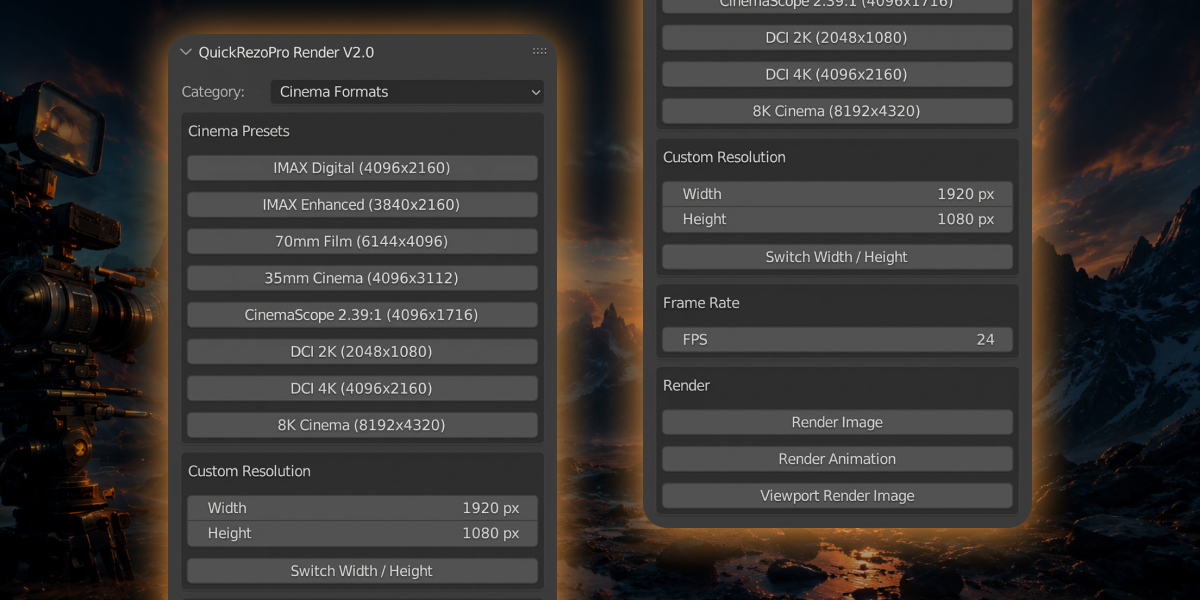
- Cinema formats: IMAX Digital and IMAX Enhanced, DCI 2K and 4K, CinemaScope, and 35mm and 70mm film formats.
- Camera formats: presets for Sony Cinema, Canon Cinema, Panasonic VariCam, and Kodak film formats.
- Panoramic and 360° output: 2:1 and ultra-wide panoramas, plus spherical presets at 4K, 8K, and 16K.
The listing specifies 8K and 16K support; the FAQ says rendering at these sizes requires sufficient hardware memory and performance. The preset range is useful when a project needs output dimensions for a particular screen, cinema format, or panoramic workflow.
Set dimensions, frame rate, and render type
To open the add-on, go to the 3D Viewport, open the Sidebar with the N key, and choose QuickRezoPro Render V2.0. Select a category and preset; Blender's render resolution updates automatically. The product documentation also describes manually editing width and height, switching those values for portrait output, and setting the frame rate.
Quick access controls are listed for rendering a still image, an animation, or a viewport preview. The add-on organizes resolution and render controls; it does not improve image quality by itself.
Compatibility and installation
Superhive lists Blender versions 2.8 through 5.2 and names Cycles and Eevee in the product details. The product FAQ also lists Workbench as a supported render engine. Installation uses the supplied ZIP: in Blender, open Edit → Preferences → Add-ons, choose Install, select the ZIP, and enable the add-on. The listing says the download includes an installation guide, lifetime updates, and support. Check the product FAQ for further compatibility details.