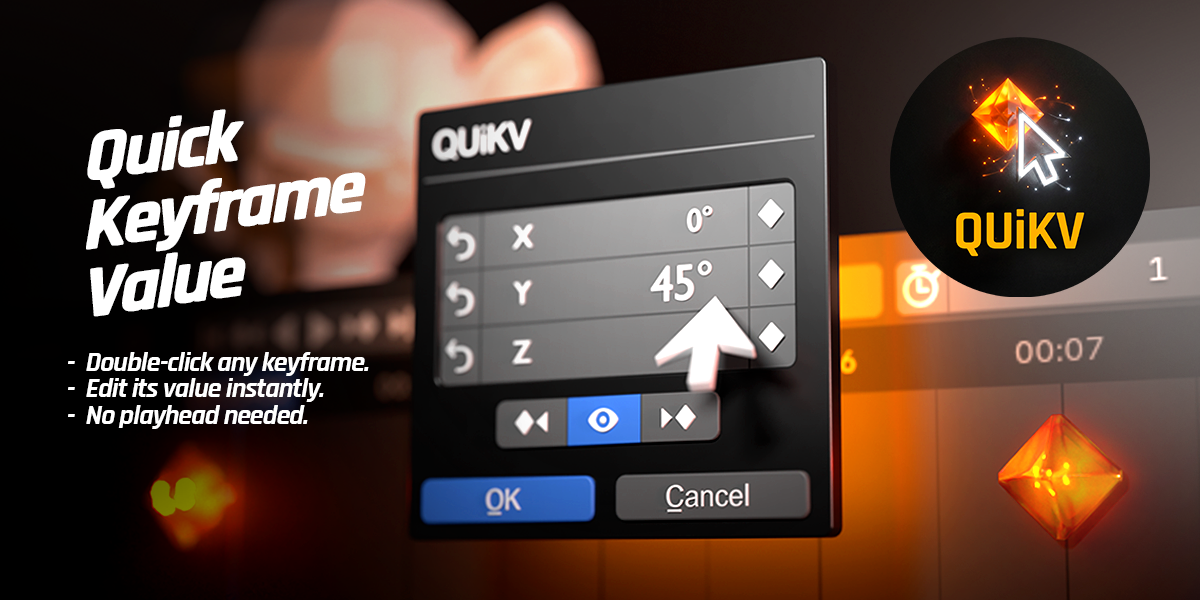
Quikv - Quick Keyframe Value is a Blender add-on for editing a keyframe's exact value from the keyframe itself. Select and highlight a keyframe, then double-click it to open the editing popup.
Edit and navigate keyframes in place
Quikv lets you move between keyframes and edit them without reopening the popup each time. Version 1.4.0 places the popup near the cursor and updates the playhead when you use the next or previous keyframe controls. The Reset and Keyframe Toggle buttons also indicate whether a keyframe exists at the current frame.
You can add or remove a keyframe per axis with a click. These controls work only for properties Blender allows to be keyframed, and a property with a single value will show a single-channel interface.
Work with channels and node properties
When a selected property has related channels, Quikv detects them for multi-channel editing. Version 1.4.0 also fixes multi-channel display for bone rotation and location properties in Pose Mode. The available channels depend on the property being edited.
The add-on can edit values on Geometry Nodes and Shader Nodes properties. For a Geometry Nodes input, double-click a keyframe on the modifier property. Clicking a node inside the node editor does not identify that animated property. Some custom properties may not be fully detected, and nested modifier properties can require a specific selection.
Preview changes and recover edits
The eye icon toggles live preview, which updates the 3D viewport while you work. Preview can lag in complex Geometry Nodes setups, scenes with heavy modifier stacks, high-poly meshes, or scenes with multiple particle systems. If that happens, turn preview off, make the edits, and click OK to apply them once.
Undo and Cancel restore the original state per channel. Quikv tracks keyframe deletions made during the current editing session; it cannot restore a keyframe that was deleted before the popup opened.
Compatibility and editions
The product listing gives Blender 3.0 to 5.3 as the compatibility range. Full interface support, including the Cancel button, requires Blender 4.1 or later. The listing identifies Quikv as GPL-licensed and presents Lite and Pro editions. Check it for current edition details and pricing.