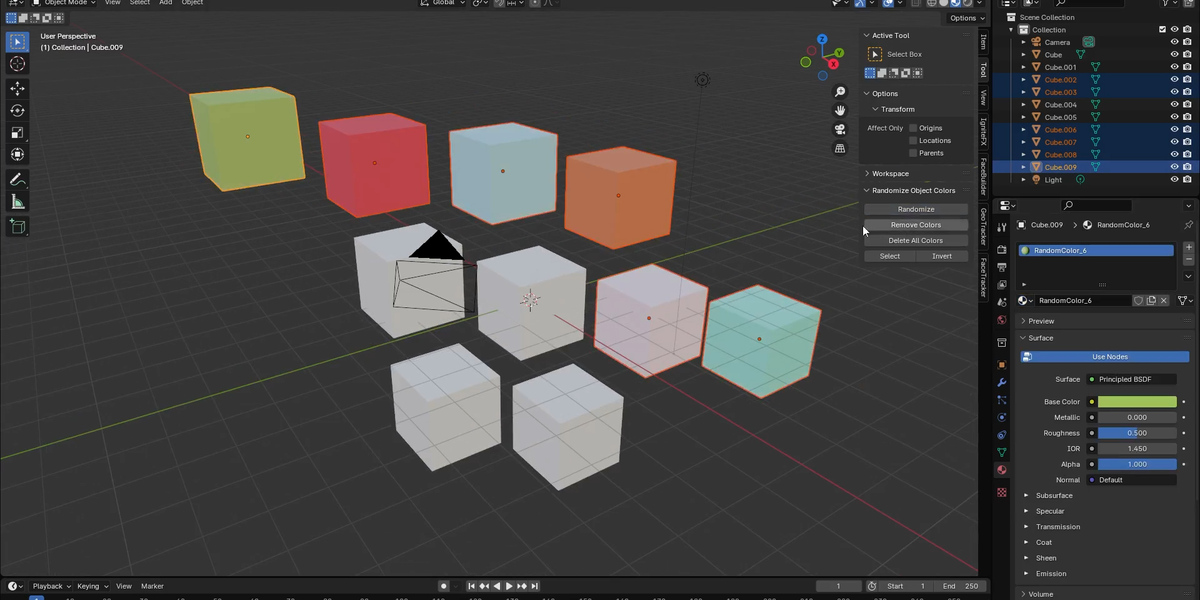
Randomize Object Colors Add-On is a Blender tool for applying randomly generated colors to selected mesh objects. It can help distinguish objects in a scene, then provides controls to remove the colors or manage the generated materials.
Apply colors to selected meshes
Select one or more mesh objects and use Randomize to assign colors. The developer documentation describes these related controls:
- Remove Colors clears random colors from selected mesh objects.
- Delete All Colors removes the random materials created by the add-on across the scene, leaving other materials untouched.
- Select Meshes with Random Colors selects mesh objects that have been assigned random colors.
- Invert Selection inverts the mesh-object selection while ignoring lights, cameras, and other non-mesh objects.
Clean up generated materials
After Randomize, the add-on removes unused random materials. The add-on also renames and organizes the remaining random colors.
Check compatibility and documentation
The Superhive listing names Blender versions 4.2, 4.1, 4.0, 3.6, 3.5, 3.4, 3.3, 3.2, 3.1, 3.0, 2.93, 2.92, 2.91, and 2.9. It identifies George Kayesi as the developer and lists the MIT license. Check the product listing for its current details and the developer documentation for usage instructions.