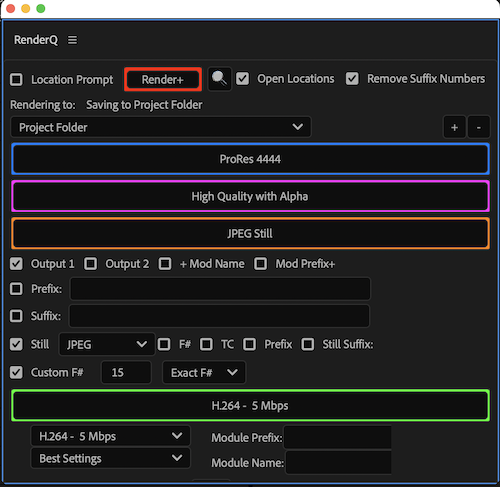
RenderQ is an After Effects script for queuing movies, stills and thumbnails to new or saved locations. Its four configurable buttons let you set up recurring output combinations, and it can batch queue selected comps and still frames.
Set up repeatable outputs
Configure each button for the output modules and still-frame option you use for a particular kind of job. A single button can produce one output module, a pair of module outputs, or those outputs alongside a still. This suits projects where you regularly render multiple versions or switch among output modules.
RenderQ lets you choose output settings and locations in advance, which can reduce changes to individual items in After Effects' Render Queue.
Choose destinations and naming
Save folder locations for reuse, include the project folder, or have RenderQ prompt you to choose a destination. Prefix and suffix controls can add temporary text, a custom name or an output-module name to renders. In version 1.3, prefix options can also define render-folder paths and create folders that do not already exist.
Create stills and find completed renders
Choose a still frame from the Current Time Indicator, enter a frame number from the start of the composition, or specify an exact frame number. RenderQ includes four still-frame output settings, with options such as adding a frame number or timecode.
Render+ starts the render, removes extra suffix numbers from still-frame renders and brings the rendered folder to the foreground when the job finishes. A separate render-locations control reopens folders used by recent Render+ jobs.
When RenderQ fits a workflow
RenderQ is aimed at After Effects users who batch queue comps, deliver multiple output versions, create stills alongside movie renders, or reuse render destinations. Its configurable buttons are most useful when those combinations recur; for occasional one-off renders, consider whether reusable settings would save enough repeated setup for your work.
Version 1.3, released May 21, 2026, added the project-folder destination and prefix options. Check the RenderQ listing on aescripts for the developer's compatibility details and licensing terms.