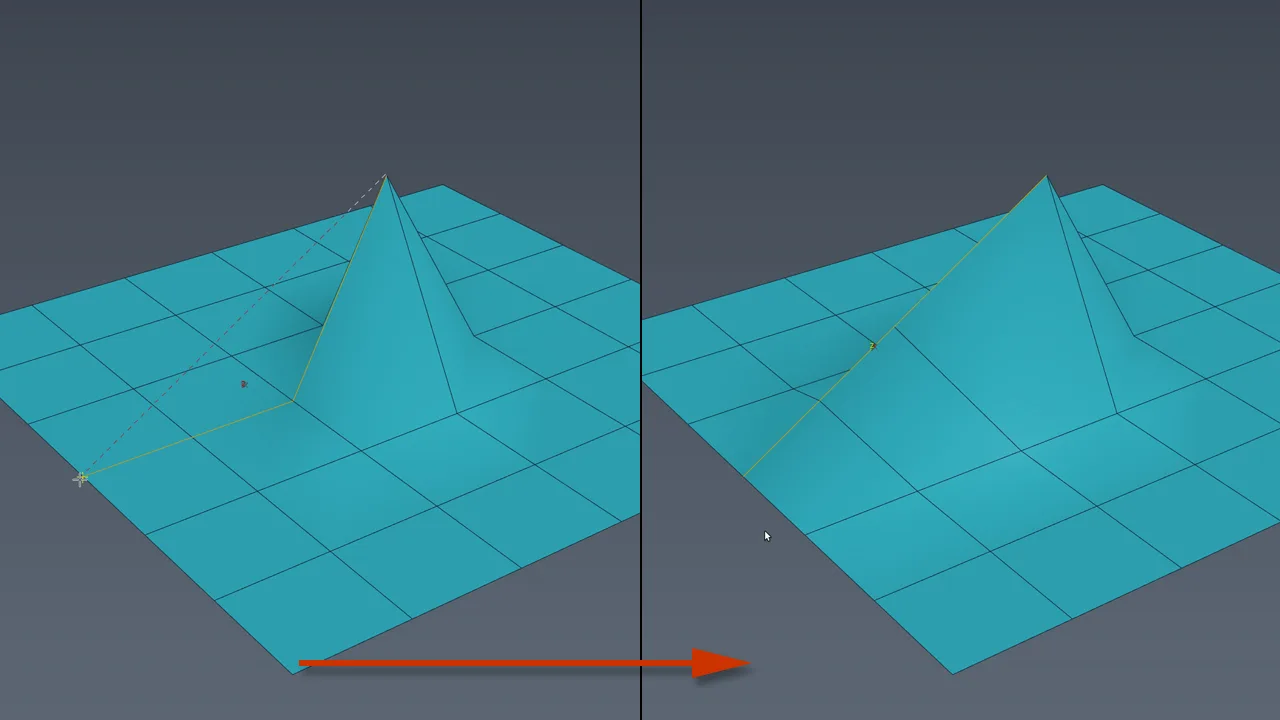
Rotate To Grid is a FishMan MAXScript for 3ds Max. Select one edge on an Editable Poly object or an object with an Edit Poly modifier, then run the script. It aligns the object to the closest axis along that edge using face normals, similar to Align to Edge in Unwrap UVW.
Where it helps
The script can straighten a background plane when its reference image is misaligned. FishMan suggests cutting an edge with QuickSlice, then aligning the plane to that edge. It can also restore object orientation after transformations have been lost, such as after Reset X-Form.
How it handles face normals
For an edge shared by non-planar faces, Rotate To Grid uses the average normal when the faces share at least one smoothing group. When they have no smoothing group in common, it uses the normal of one face. ScriptSpot does not identify which face is used in that case. Select a single edge; the listing warns that multiple selected edges may produce unexpected behavior.
Install and assign it
Run the .ms script by dragging it onto the 3ds Max viewport or choosing Scripting > Run Script. Then find Rotate to Grid in the Custom category of Customize User Interface or the Hotkey Editor. You can assign a hotkey or place it on a custom toolbar.
Tested versions
The ScriptSpot listing lists version 1.0, updated June 20, 2023, and says it was tested with 3ds Max 2023 and 2024. It does not state results for other releases. Check the listing for its current download and details.