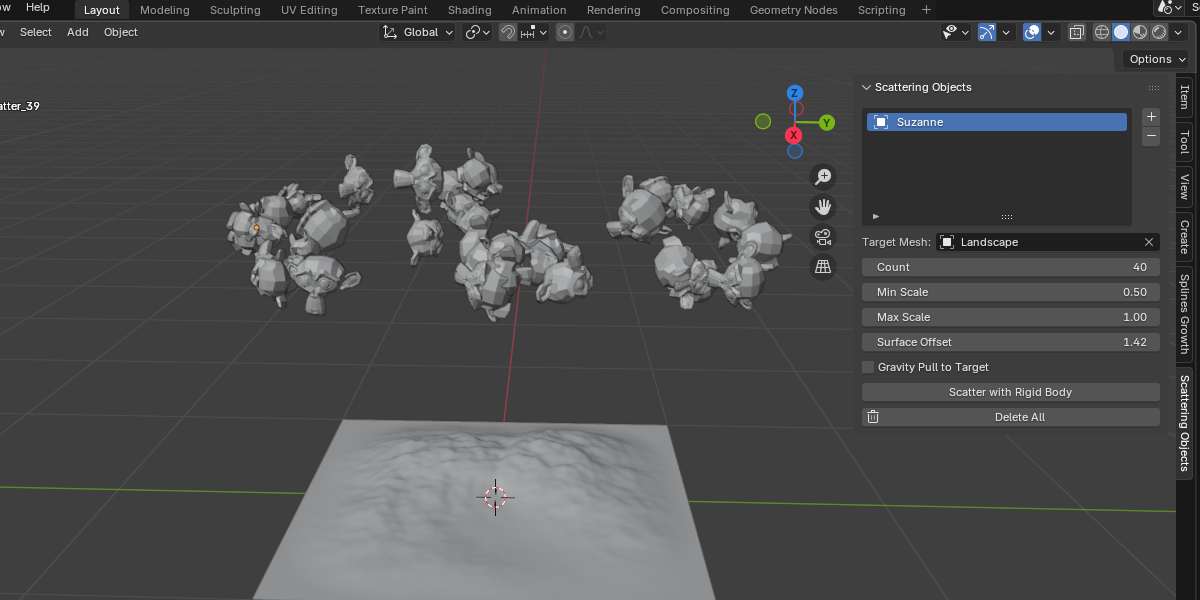
Scattering Objects is a Blender add-on by Mergim Sahiti for distributing objects across a target mesh. It scatters objects with rigid body physics and random rotation and scale; optional harmonic gravity pulls them toward the target mesh. The product listing describes uses such as placing rocks, trees, or props in a scene.
How to scatter objects on a target mesh
- Add each source object to the add-on’s scatter list with Add Scatter Object.
- Assign the mesh that will receive the scattered objects as the target.
- Set the object count, minimum and maximum scale, and surface offset.
- Choose Scatter with Rigid Body. The documentation says the scattered objects become active rigid bodies and the target mesh becomes passive. Rotation and scale can vary between placements.
You can enable harmonic gravity pull to attract scattered objects toward the target mesh. The settings include strength, distance, and maximum offset. The documentation describes this option as creating an empty with a harmonic force field.
Adjust placement and reset a scatter
Random placement can leave some objects overlapping. If spacing is poor, adjust the count, scale range, or surface offset and scatter again. The documentation also recommends starting with fewer objects to check scale and gravity settings, and saving the scene before scattering many items.
Add or remove source objects from the scatter list as the scene changes. You can work with selected objects or the full list. Delete All removes objects created by the add-on; Blender’s Undo command (Ctrl+Z) can also undo a scatter operation, according to the product FAQ.
Compatibility and license
The listing covers Blender versions 4.0 through 4.5 and names Arnold, Blender-Internal, Cycles, Eevee, and Octane under “Render Engine Used.” It identifies the license as GPL. Check the current listing for compatibility and license details before installing.