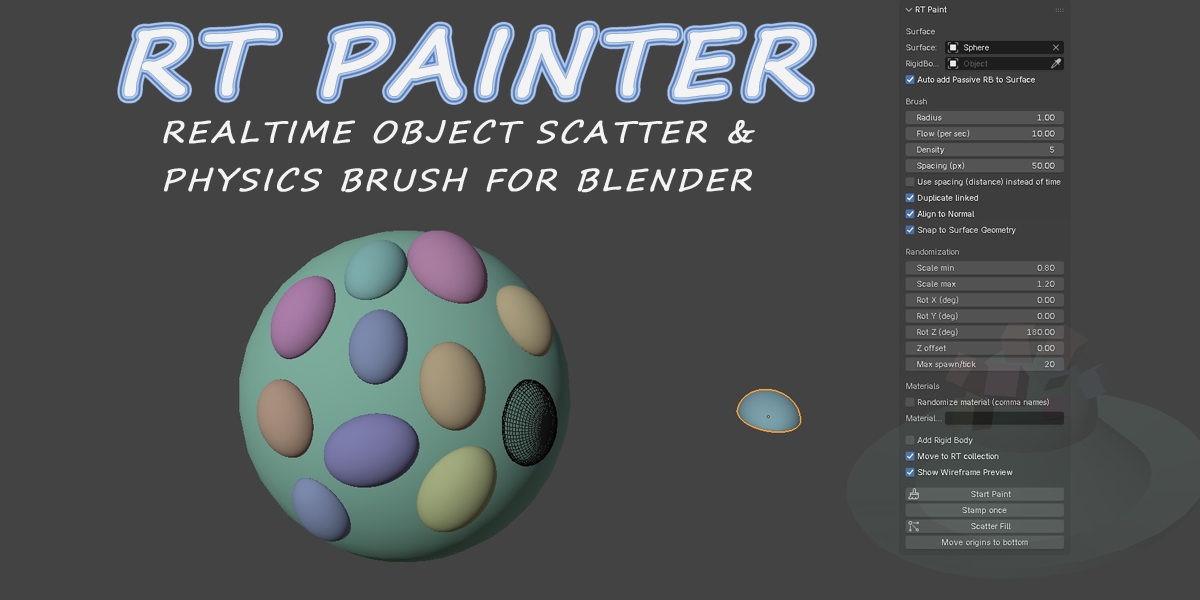
RT Painter is a Blender add-on by Adrian Kulawik for painting selected objects into a scene. It combines brush-based scattering with surface placement, object variation and optional rigid body setup. Environment artists, level designers and concept creators can use it to place assets such as rocks, trees, grass, debris or props.
Paint assets in the viewport
According to the product documentation, select one or more objects to use as the paint pool, then open the RT Paint tab in the 3D Viewport sidebar. Starting Paint enters a modal mode: click with the left mouse button to place one object, or hold it to paint continuously. The documentation also assigns nearby-object erasing to the right mouse button and uses Escape to exit modal mode.
Brush settings include radius, flow, density and spacing. RT Painter supports pressure-sensitive distance-based spacing as well as time-based flow. An optional wireframe preview shows placements before they are made.
Adjust placement and variation
Placement uses a viewport raycast to find a surface. You can align objects to surface normals or snap them to geometry; when the raycast hits no surface, placement falls back to the view plane. Spawning stays within the brush radius and applies minimum-distance checks to limit clustering.
Randomization controls cover scale within a selected range, rotation on each axis, vertical Z offset and material assignment from a comma-separated list of material names. These settings help vary repeated assets while painting.
Use physics and placement tools
RT Painter can add active rigid bodies to painted objects and optionally add passive rigid bodies to the surface for collisions. Spawn clearance lifts objects slightly above a surface to reduce immediate clipping. The Move Origins to Bottom tool adjusts selected objects' origins to the bottom of their bounding boxes, which the documentation describes as useful for stable physics.
Stamp Once places a single object at the viewport center. Scatter Fill randomly populates the viewport with up to 50 objects, a cap that can be adjusted in code. Auto-collection keeps painted objects organized, linked duplication maintains object references, and a per-tick spawn cap helps limit lag during painting.
Compatibility and license
The product overview says Blender 4.5 and later, while its details list Blender 4.5–5.0. The current listing does not resolve whether builds later than 5.0 are supported; confirm your exact Blender build with the developer. The listing identifies the license as GPL.