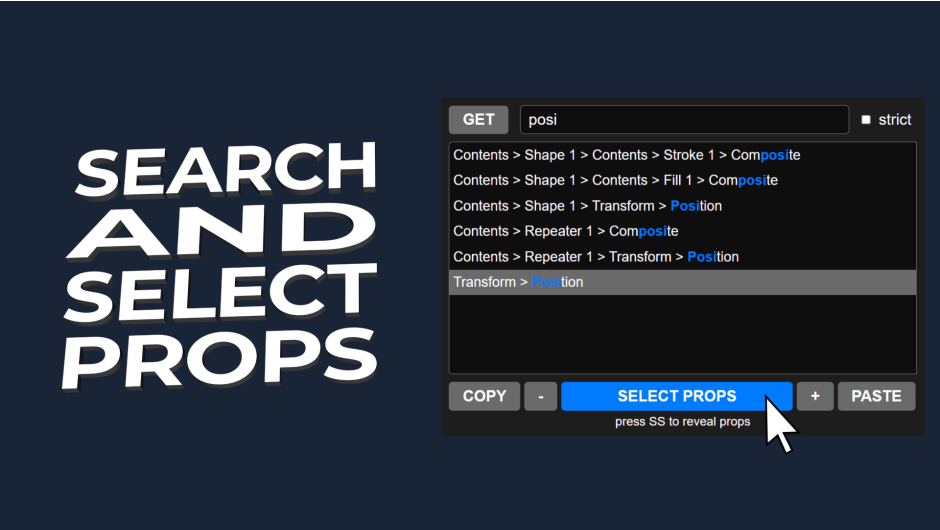
Search and Select Properties is an After Effects utility by Airweb for finding properties by name, selecting multiple properties, and copying or pasting those selections. Its stated purpose includes helping avoid duplicate group problems when copying properties. The developer’s product listing includes a free trial.
Find and select properties by name
Search for a property by name to locate it in a composition. The tool selects multiple properties at once and displays results in alphabetical order. An optional Strict setting refines the search criteria for more precise results; the product listing does not specify the exact matching rules.
Version 1.03 added the ability to search for and select multiple properties at once. That can help when a task involves several property searches, while the alphabetical results in version 1.04 make the returned list easier to scan.
Copy and paste selected properties
After locating the properties you need, use the copy and paste controls to reuse the selected properties in your After Effects workflow. Selecting multiple properties at once reduces manual selection.
Version 1.02 improved the COPY and PASTE buttons. Version 1.01 changed the GET button so it selects the last item in the list instead of selecting all items.
Compatibility and version notes
The listing gives version 1.04 as compatible with After Effects 2025, 2024, and 2023. Version 1.04, dated October 21, 2024, added alphabetical result ordering, updated the license framework to version 4.3.1, and included fixes for local license activation with a configured license server, license deactivation error -38, and activation error -6. Check the developer’s listing for compatibility with newer After Effects releases and current license details.
Who may find it useful
Search and Select Properties may suit After Effects users who regularly look up named properties, select several at once, or copy and paste properties as part of their composition work. Its listed features make it most relevant when those steps recur and manual searching slows down the workflow.