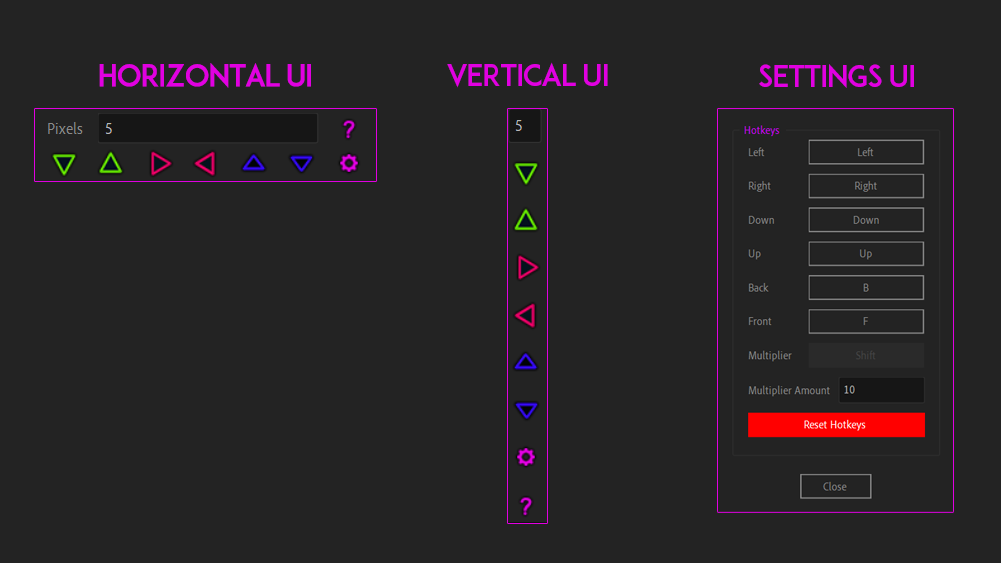
Pixel Pusher is a KiwiVFX script for Adobe After Effects that moves selected layers by a pixel amount you define. It uses transform position on the X, Y and Z axes, so you can nudge one layer or a selection by a measured step.
Adjust layer position in measured steps
Set the pixel amount, then use the push controls to move selected layers. Decimal values allow smaller adjustments, and a multiplier scales the amount. The script supports multiple layers and keyframes, which is useful when applying a defined position change across a selection.
Pixel Pusher also supports 3D layers through Z position. You can configure its keyboard shortcuts; the product listing says they work when the interface is selected. The panel adjusts to horizontal or vertical layouts, and the feature list describes it as Windows and Mac friendly.
Compatibility and version details
The compatibility list covers After Effects releases from CS5 through 2024. The product page identifies version 1.2.3, with a version history entry dated March 3, 2024. That entry notes a dialog for an empty Project panel and a check for whether the selected item is a composition. See the aescripts product listing for current download and license details.