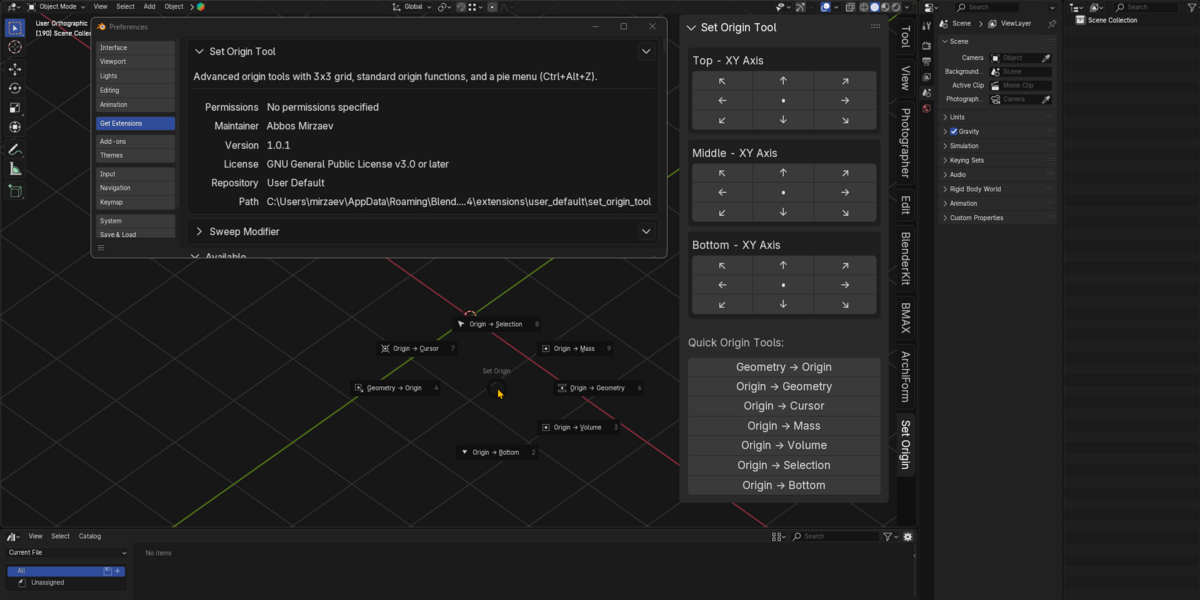
Set Origin Tool is a Blender add-on by Abbos Mirzaev for placing an object's origin, or pivot. It combines a 3×3 grid for positions around an object's bounding box with quick origin commands and a pie menu. The controls are intended for modeling, rigging, and layout work. Check the product listing for version and compatibility details.
Choose an origin placement method
The grid places an origin at the top, center, bottom, left, right, or one of the bounding box's corners. Quick Origin Tools provide one-click access to these operations:
- Geometry → Origin
- Origin → Geometry
- Origin → 3D Cursor
- Origin → Center of Mass
- Origin → Center of Volume
- Origin → Selection
- Origin → Bottom
Press Ctrl + Alt + Z to open the pie menu in the 3D Viewport. The panel is in the viewport sidebar under the Set Origin tab.
Check the mode and object type
The Top Panel works in Object Mode. Quick Origin Tools work in both Object Mode and Edit Mode. The add-on supports Mesh and Curve objects and can switch modes automatically for transforms. During batch operations, objects outside those two types are ignored. The product listing describes changes as reversible through Blender's undo system.
Install and check compatibility
Before installing on a Blender release above 4.4, confirm compatibility with the author because the marketplace's compatibility fields conflict: its summary says Blender 3.0 and above, while its version details say 3.0 through 4.4. The product documentation lists these installation steps: download the ZIP from Blender Market, choose Edit > Preferences > Add-ons > Install in Blender, select the ZIP, install it, and enable the add-on. Then open the Set Origin tab in the 3D Viewport sidebar or use the pie menu shortcut.
The marketplace lists version 1.0.1, Blender Extension compatibility, and an MIT license.