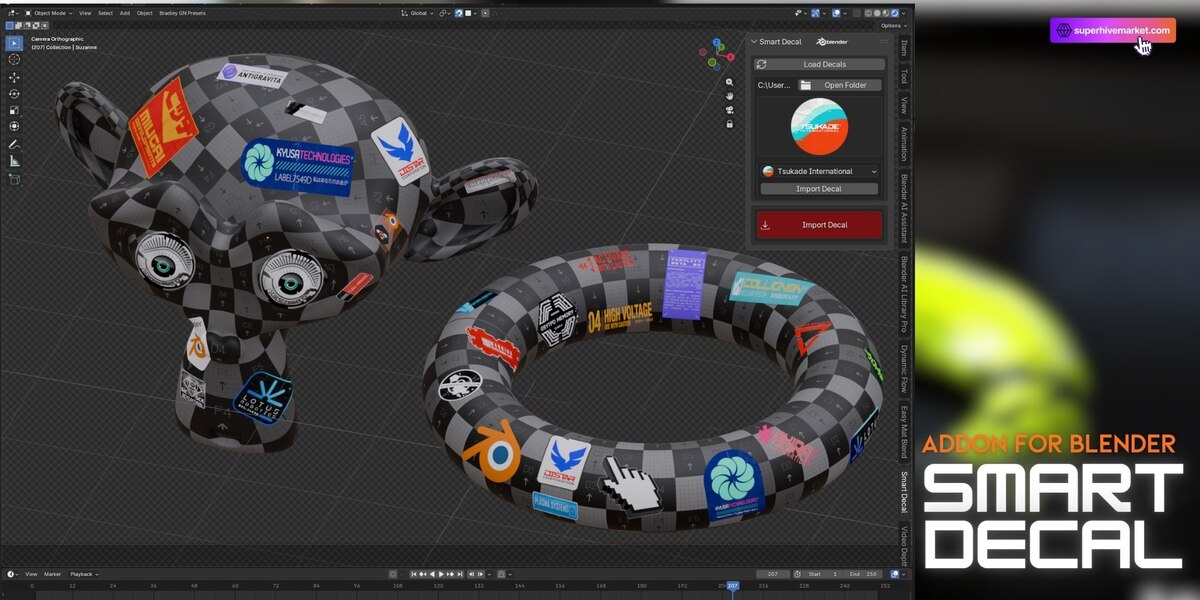
Smart Decal is a Blender add-on for placing decals on objects with a raycast workflow. It detects the surface under your mouse and automatically aligns the decal, including its position and rotation. The product listing marks it as Blender Extension compatible and describes the workflow as non-destructive.
Place a decal with the loaded library
Click LOAD Decals to load the decal library. Choose a decal from the preview list and click Import Decal. Move it over your object, then place it using the raycast workflow.
Import your own decal maps
You can use your own files instead of choosing from the loaded library. The red Import Decal button opens a direct import path for selecting decal maps, so you do not need to load the library first. Smart Decal also assigns materials automatically during import.
The product listing says the add-on includes more than 100 ready-to-use decals and identifies their maps as AI generated. You can load these through the library and select from its previews
Snapping and supported uses
Snapping support is included for placement. Potential uses include hard surface detailing, sci-fi panels and labels, damage and dirt decals, product visualization, environment detailing, and game asset creation; the product listing does not specify separate presets for these uses.
Compatibility and license
The product listing marks Smart Decal as Blender Extension compatible, lists Blender versions 5.1–5.3, and gives the license as GPL. Check the listing for its stated Blender version range before installing, and use its documentation for placement steps.