Smartist Macros, also listed as SMS Macros V2, is a Blender extension for recording and replaying sequences of operations, property changes, and asset appends. It can save recurring setup work as a macro set, such as a render configuration or a series of Edit Mode operations.
The Superhive listing marks it as Blender Extension Compatible and names Blender 5.1 in its Blender Version field. SmArtist Studios notes that not every Blender feature and operator has been fully tested, and behavior may vary with the Blender version, active extensions, or use case.
Record operations and asset actions
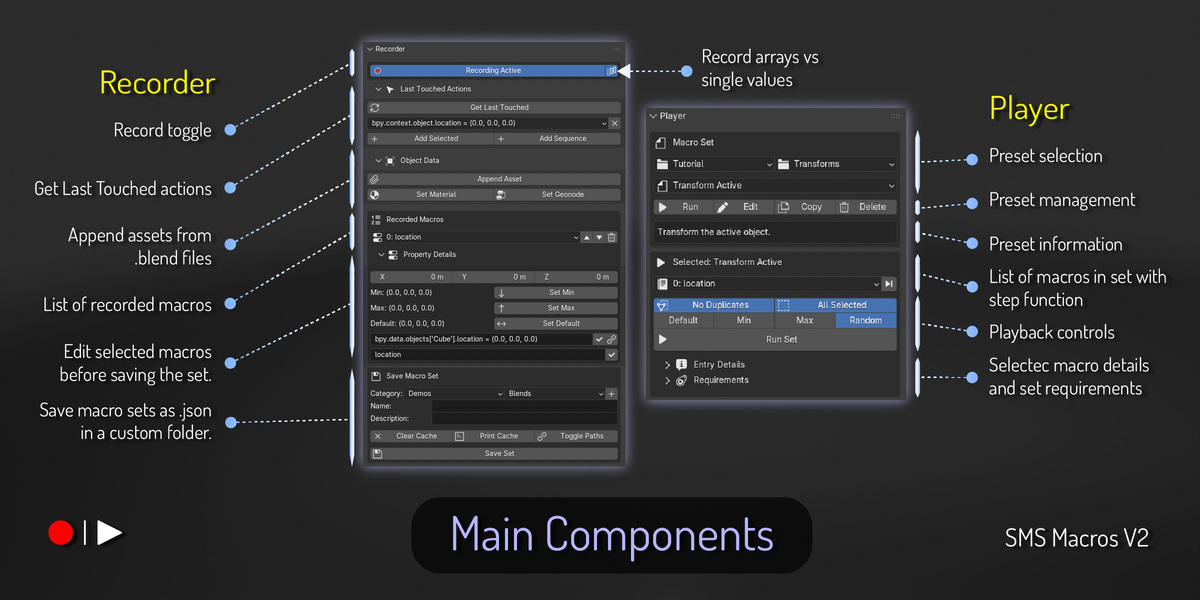
Smartist Macros supports asset macros that append to the active object or scene, along with recording and playback of advanced mesh operations in Edit Mode. To build a set, you can right-click a Blender interface button or property to add it as an entry. The Last Touched feature can also capture recent operations from Blender’s Info area.
Entries can cover operators, property assignments, materials, Geometry Nodes, node groups, modifiers, render and view settings, and object data. The extension can also save custom add-on sets, theme preferences, render setups, and area-specific macro sets.
Choose values when a macro runs
For a property entry, you can store default, minimum, and maximum values. When recalling the macro, choose Default, Min, Max, or Random. This lets one saved set use different stored values without editing the entry each time. You can later change value ranges, rename entries, edit Python commands, or switch between absolute bpy.data paths and relative bpy.context paths.
Organize presets and keep referenced assets nearby
Macro sets are saved as JSON files in a folder you choose, with categories and subcategories for organizing a library. For asset macros, Smartist Macros can append datablocks from a .blend file and optionally bundle referenced assets into a companion .blend file. The extension also lets you duplicate, delete, or re-path those companion files.
When replaying a set, No duplicates mode can prevent redundant modifiers, materials, or objects from being created. A macro set can also run across all selected objects. If you have older V1 macro sets stored as Blender text blocks, the listing describes a one-click import into the V2 JSON format.
Where it may fit
Smartist Macros is suited to Blender users who repeat a sequence of setup or editing actions and want to save it for later playback. Its value depends on whether the operations in your workflow behave consistently in your Blender setup. Review the SmArtist Studios documentation for usage details, and check the Superhive product listing for current product information.