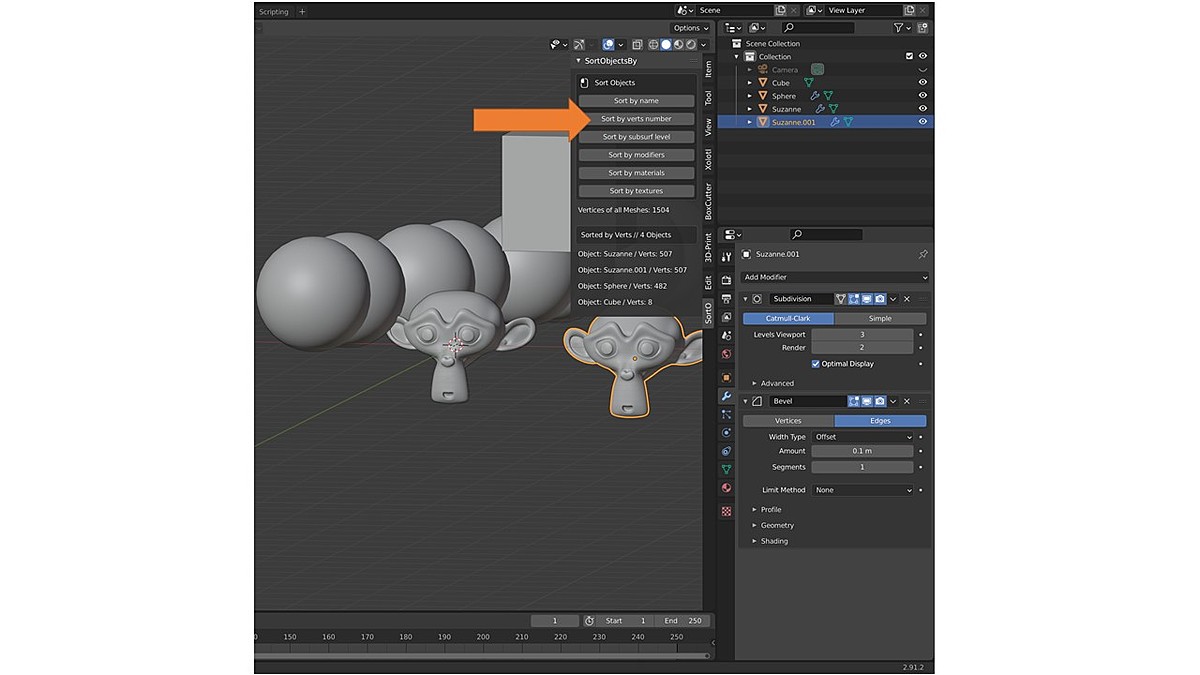
Sort Objects By is a Blender add-on for reviewing mesh objects in a scene. It orders them by name, vertex count, modifier count, subsurf level, materials, or textures, then presents a ranking to help locate objects worth inspecting.
How the panel works
Open the panel in Object Mode from the N-panel in 3D View. It reports the active sort method, the number of considered objects, and their total vertex count. Only objects with a mesh are considered. Choose a sort method and press its button to refresh the results.
Sorting criteria
- Name lists considered objects by name.
- Vertices ranks objects by their mesh vertex counts, without modifier effects. Subdivision-generated vertices are not included in this count.
- Modifiers ranks objects by modifier count and lists their modifiers. A filter can limit the displayed modifiers to the documented physics category.
- Subsurf ranks by viewport level and displays viewport and render levels together.
- Materials ranks by material count and lists the materials. Empty material slots are not shown.
- Textures ranks and lists textures on assigned materials. Empty texture nodes are omitted. The version notes describe a filter for textures linked to a normal input.
Using the ranking
The ranking can help you find objects with high base mesh counts or many modifiers for closer inspection. Modifier, material, and texture lists add context about each object. Treat the results as an inventory of scene attributes: the documented counts do not measure render time or memory use.
Compatibility and license
The Superhive listing lists Blender 2.8, 2.81, 2.82, 2.83, 2.9, 2.91, 2.92, 2.93, 3.0, 3.1, and 3.2. The supplied compatibility list stops at 3.2, so support for later releases is unconfirmed. The add-on is released under the GPL license. Its documentation covers installation, sorting behavior, filters, and version notes.