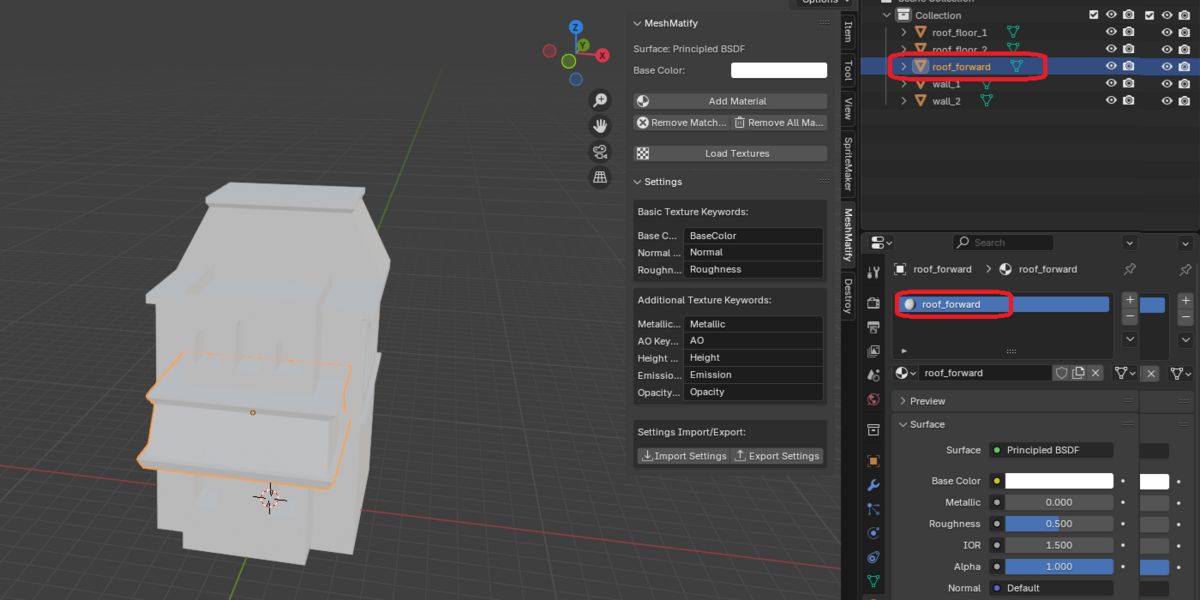
Mesh Matify is a Blender add-on from EasyAddons for setting up basic materials on selected mesh objects. It names each new material after its mesh, then can match textures in a chosen folder to meshes by name. This can help when preparing materials for scenes with many objects.
How Mesh Matify handles materials
- Select the mesh objects and choose Add Material. Mesh Matify creates basic materials with names that match the selected meshes.
- Choose Load Textures and select a folder. The add-on matches textures to meshes using mesh names and keywords for texture types.
The listed map types are Base Color, Normal, Roughness, Metallic, Ambient Occlusion, Height, Emission, and Opacity. You can change the keywords used to recognize texture types, which can help when your texture naming conventions differ from the defaults.
Settings and compatibility
Mesh Matify puts its controls in a panel in Blender's 3D Viewport. Its settings can be imported and exported, so configurations can be saved or shared. The Superhive product listing credits EasyAddons, identifies the add-on as GPL-licensed, and says it runs on Windows, macOS, and Linux.
The listing describes compatibility with Blender 4.0.0 and later and specifically names Blender 4.0, 4.1, 4.2, and 4.3. Check the seller's current details if you use a newer release. The listing describes Mesh Matify's scope as quick, basic material setup, with texture matching based on mesh names and type keywords. If your files use an unusual naming scheme, confirm the expected pattern before building a workflow around it.