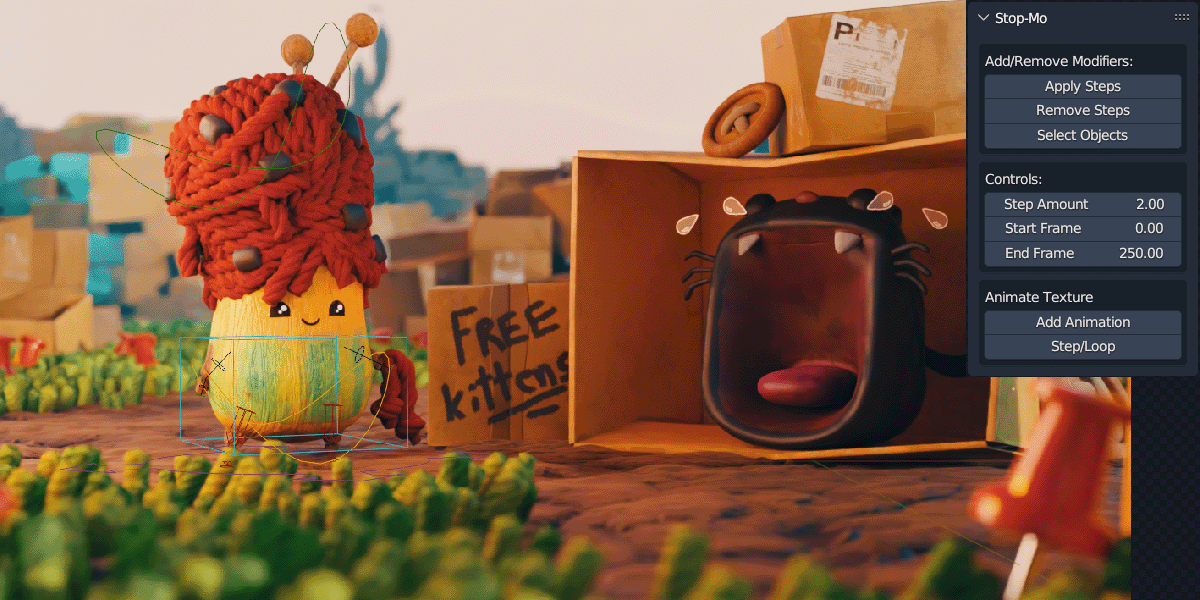
Stop-Mo is a free Blender add-on from SouthernShotty LLC that gives existing 3D animation a stop-motion look. Apply it to selected objects for a one-click conversion, then use the frame controls and preview to adjust the result.
The add-on is aimed at character animation. Its documentation says the effect applies to animated bones on selected characters. Some other objects and elements may work, but the developer does not guarantee use outside character rigs.
Adjusting the animation
Stop-Mo lets you set the effect's start and end frames and control how many frames fall between displayed keyframes. A real-time preview helps you inspect the stepped result while working. The effect can also be removed with the Remove Steps control.
The add-on supports one frame range at a time. For example, its documentation says you cannot set one range from frames 20 to 60 and another from 90 to 180 in the same setup. Select and Remove controls are also available for managing objects with the effect applied.
Animating textures
Stop-Mo includes separate controls for texture rotation. In the shader window, select a Mapping node and use Add Animation to add rotation keyframes on the Z value. Step/Loop sets selected keyframes to constant interpolation and adds cyclic modifiers.
Compatibility, license and support
The Superhive listing identifies Blender versions 3.4 through 5.1 and a GPL license. The creator says Stop-Mo was made for a personal short film and that they do not plan to provide product support. The documentation explains the controls and rig limitations; a tutorial video is also linked. Check the product listing for its current details.