Swift Slides from Salt Media is a Premiere Pro extension for building slideshows from images and music or other audio selected in the timeline. It fits the slideshow to the selected audio and provides controls for image resizing, motion and transitions. The developer lists version 1.2.0, released October 27, 2026, with support for Premiere Pro versions 2023 through 2027.
Build a slideshow from the timeline
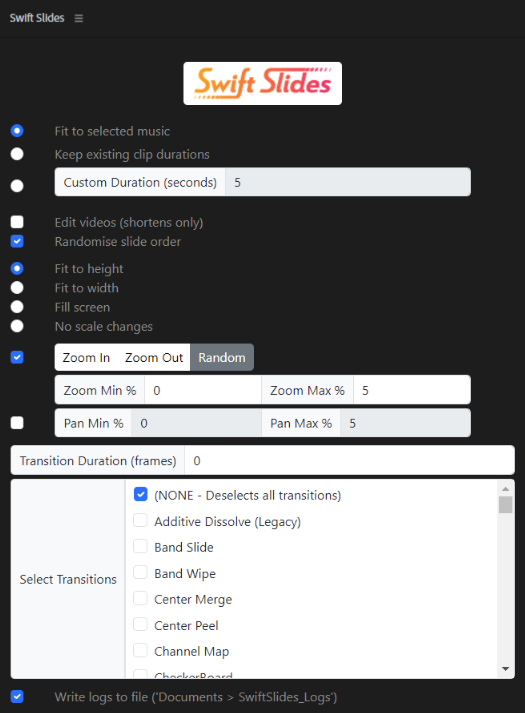
Select the images and audio in the Premiere Pro timeline, adjust the settings, then run Swift Slides. The extension builds the slideshow to fit the selected audio. That workflow suits projects such as photo sequences where the images need to run alongside a chosen music track.
Adjust image movement and transitions
Swift Slides can resize images automatically. Zoom settings include zoom in, zoom out or random direction, with minimum and maximum values. Set both values to the same percentage to use a fixed amount. Pan has its own minimum and maximum range. Zoom and Pan keyframes are created only when their respective options are enabled.
You can select multiple transition types. Swift Slides applies the selected transitions at random between slides, so the sequence can vary without choosing each transition individually.
Keep existing clip durations
Version 1.2.0 added a "Keep existing clip durations" option. When enabled, Swift Slides applies zoom, pan and transition animations without changing the selected clips' durations. The developer describes it as useful for beat-synced and mixed-duration slideshows.
Compatibility and troubleshooting
The current listing names Premiere Pro 2023, 2024, 2025, 2026 and 2027 as compatible versions. Compatibility can change with future releases, so check the Swift Slides listing before installing.
A debug checkbox controls whether Swift Slides writes log files. When enabled, the logs are saved in the Documents > SwiftSlides_Logs folder. The developer added this option in version 1.1.0.
Trial and purchase
The developer offers a free, fully functional trial. Check the product listing for current pricing, trial details and compatibility information.