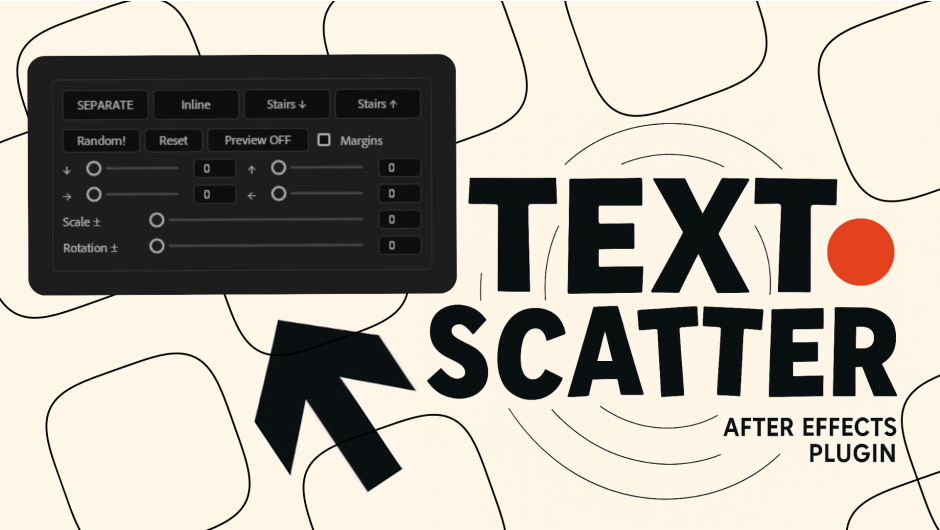
Text Scatter is an After Effects utility by Pablotrk for turning a text layer into individual word or character layers. It can reorder those elements and place them in layouts, helping motion designers prepare scattered or stepped typography without splitting each item by hand.
The aescripts product listing describes a one-click workflow for separating and arranging text.
Split text and arrange the layers
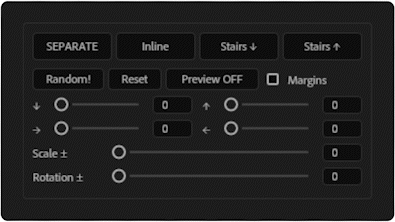
Use Separate to split a text layer into words or characters. Each element becomes its own layer for individual editing in the composition. Random changes the order with one click, while three layout modes provide different starting arrangements: Inline, Stairs Up, and Stairs Down.
A red limit box shows the composition area in real time as you work. The Reset button can restore the layout within Text Scatter's non-destructive workflow.
For example, separate a phrase, randomize its order, then choose Inline for a straight row or one of the stair modes for an ascending or descending arrangement. You can also use the red limit box as a guide while placing the elements within the composition. Since each word or character gets its own layer, longer text creates more layers to manage.
Where it fits
Text Scatter is suited to motion-graphics compositions that use individually arranged words or characters, including scattered text and stepped layouts. It handles the initial separation and arrangement; you can continue adjusting the resulting layers in After Effects.
Placement limitation
The developer notes that Separate does not preserve exact, pixel-perfect positions. If each character needs to keep its original placement, consider a tool designed for that workflow.