Utility Buddy is an After Effects project utility from SubPixel LLC. It helps you find and update fonts, expressions, effects, layer styles, and colors across comps and layers, so you can handle recurring project maintenance in one place.
Choose a scope for each pass
The Apply To control lets you work across the entire project, the active comp, or selected layers. Choose the narrower scope when a revision belongs to one composition or a specific group of layers. A project-wide scope can help when you are reviewing a file for broader cleanup.
Scope applies to actions such as replacing fonts and managing effects or styles.
Find fonts and expressions
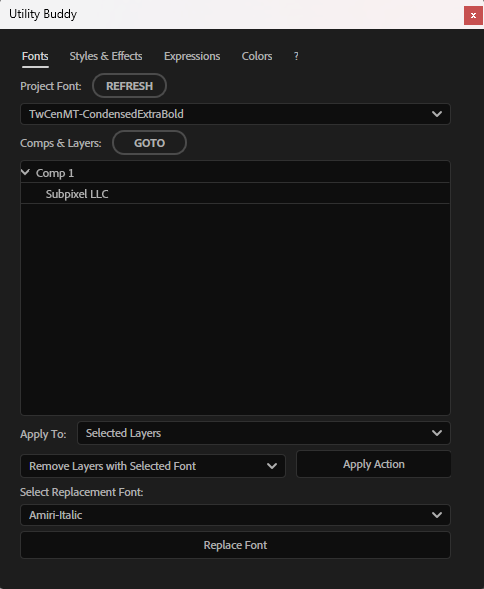
The Fonts tab shows which comps and layers use a selected font. Within the chosen scope, you can replace its instances or remove, hide, or show them. This can help while a design is still in development and its type choice may change, or when you need to find where a font appears before making a revision.
The Expressions tab finds expressions set up in the project. Utility Buddy can take you to an expression's script rather than only to its layer, and the version history lists an option to remove expressions in bulk.
Review effects, styles, and colors
Utility Buddy can find effects and layer styles in use and help locate them. Its version history lists bulk actions to remove, disable, or enable effects and styles across multiple layers. Those controls can help when cleaning up a project or preparing it for a client who needs a different set of effects.
Color search looks through colors used in effects, layer styles, fonts, strokes, and keyframes. You can use it to revise colors across the parts of a project where those values are set. The product description says gradients are not handled, except when a gradient effect sets its colors using solids.
The aescripts developer listing has a free trial and lists its current licensing and compatibility details. Check compatibility for your After Effects release before installing.