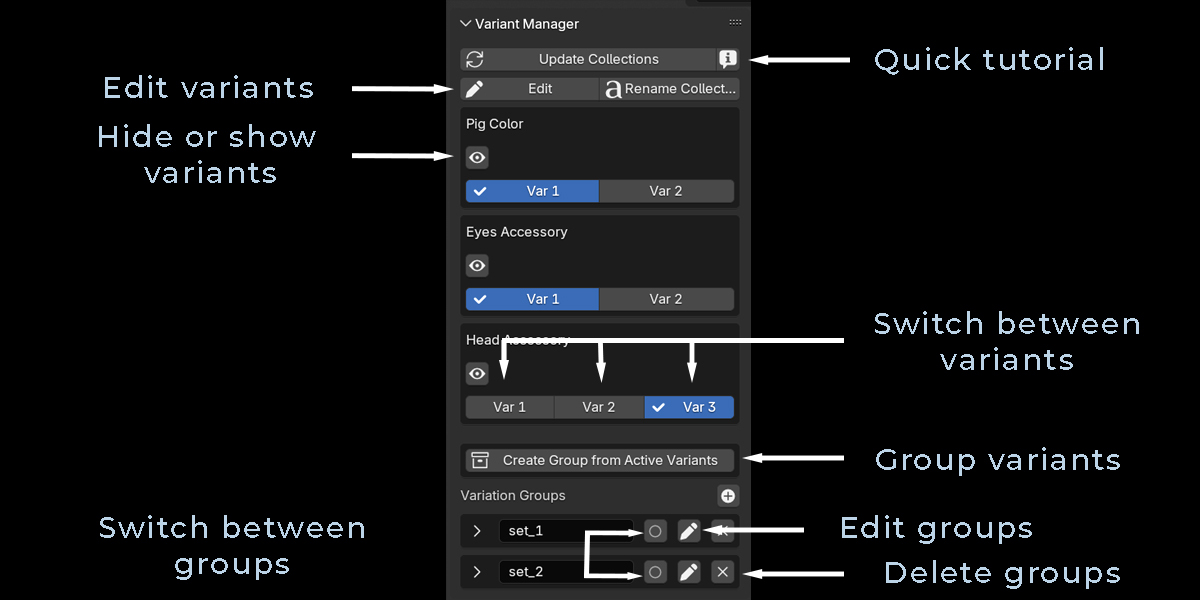
Variant Manager is a Blender add-on from Techqon core for organizing scene collections as selectable variants. Activate one variant to show it while the others hide automatically. You can also combine variants into groups for different scene setups and batch render selected variants with multiple cameras.
Switch and organize scene variants
The add-on detects collections by a naming convention that includes _var_, then lists them in its interface. The product listing gives Group_var_Name as an example; the attached manual gives SectionName_var_VariantName and says collections containing _var_ are detected. Both examples put the section or group label before _var_ and the variant name after it.
Once collections appear, use the interface to switch variants, rename sections and variants, and create groups for combinations you use together. This suits scenes with alternate product colors or materials, architectural layouts, and character outfits or accessories. Grouping options such as lighting, furniture, or walls can keep larger scenes easier to present.
Queue variants for multi-camera renders
Variant Manager can render each selected variant with each enabled camera. The manual describes a queue-based workflow:
- Enter Add Renders mode and select the variants to include. You can add a group set to include its variants.
- Add every camera or choose cameras individually.
- Choose an output folder and, if useful, enable variant folders or camera names in filenames.
- Start the render queue. The manual says only collections added to the queue are managed; other scene content stays untouched.
For alternate finishes or lighting setups, rendering each selected variant with the same enabled cameras gives you matching views of each option. The product listing names Cycles and Eevee as supported render engines.
Compatibility and license
The Superhive product details list Blender 4.2 to 4.5, mark the add-on as Blender Extension Compatible, and identify its license as GPL. Version 1.0.0 of the manual says Blender 4.0.0 or later, so the supplied pages disagree about the compatible version range. Check the current product listing and documentation before installing.
It manages the variants and cameras you add to its interface; it does not create the underlying design alternatives.