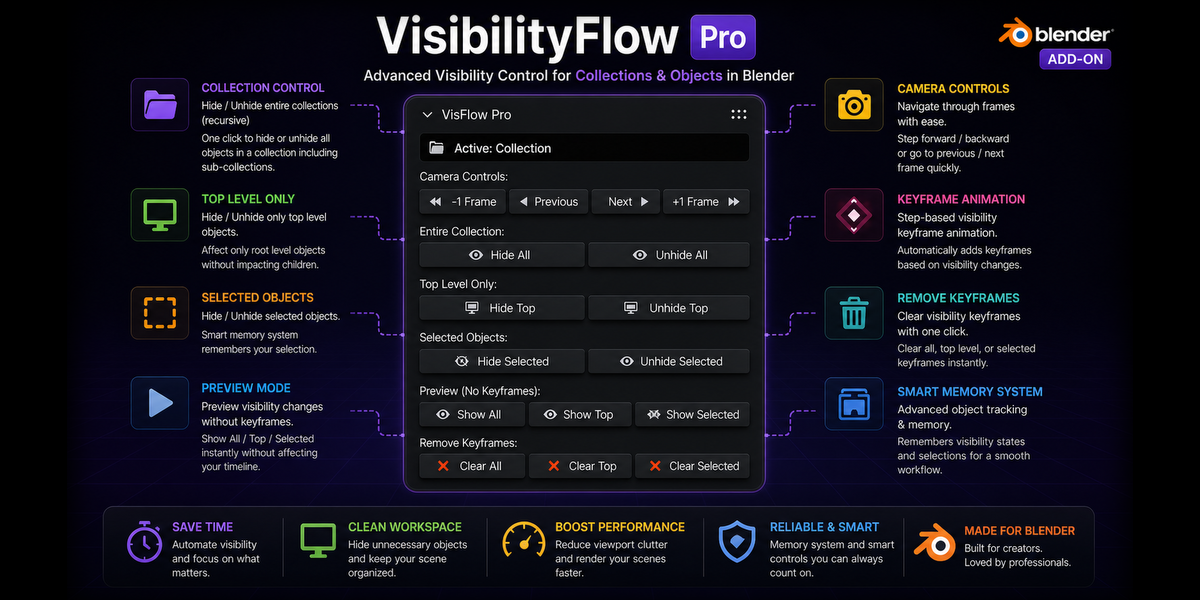
VisibilityFlow Pro is a Blender add-on for managing which collections and objects are visible in a scene. It supports recursive collection controls, visibility keyframes, temporary previews, and quick hide and restore actions for selected objects. These tools are aimed at scene organization and animation workflows, especially when a project contains many collections.
Choose how visibility changes apply
For a whole collection, VisibilityFlow Pro can hide or unhide objects recursively through nested collections. A separate top-level mode controls top-level objects without affecting nested collections. If you only need to adjust a few objects, the selected-object workflow provides one-click hide and restore controls.
The add-on also includes Hide All and Unhide All workflows, according to its documentation.
Preview changes or animate them
Use the preview tools to temporarily show objects or collections without changing animation data. When you want a visibility change to become part of an animation, the add-on can add visibility keyframes automatically as you hide or unhide. It also has tools to remove visibility keyframes when you need to clean up that animation data.
Camera marker navigation tools are included alongside the visibility controls. The product FAQ confirms that visibility animation, keyframe-free previews, and recursive collection visibility are supported.
Scene organization and rendering workflows
Animators, environment artists, game developers, and motion designers may find the controls useful when they need to manage visibility across a large Blender scene. Hiding collections can reduce viewport clutter while you work, and visibility keyframes can make scene changes part of an animation. The product is described as a rendering workflow optimization tool; its documentation does not provide render-time benchmarks, so the actual effect on render duration will depend on the scene and what is rendered.
Compatibility, installation, and privacy
The detailed compatibility field on the Superhive product listing shows Blender 4.4 through 5.2 and lists Cycles and Eevee as render engines. If you use a newer Blender release, check the creator's current listing for compatibility details.
To install, open Blender's Edit menu, choose Preferences, go to Add-ons, select Install, and choose the VisibilityFlow Pro ZIP file. The listing describes the add-on as GPL licensed and fully offline, with no data collection, tracking, or internet access required.