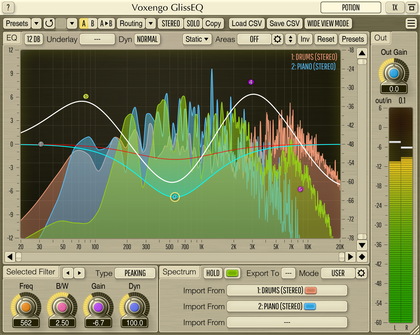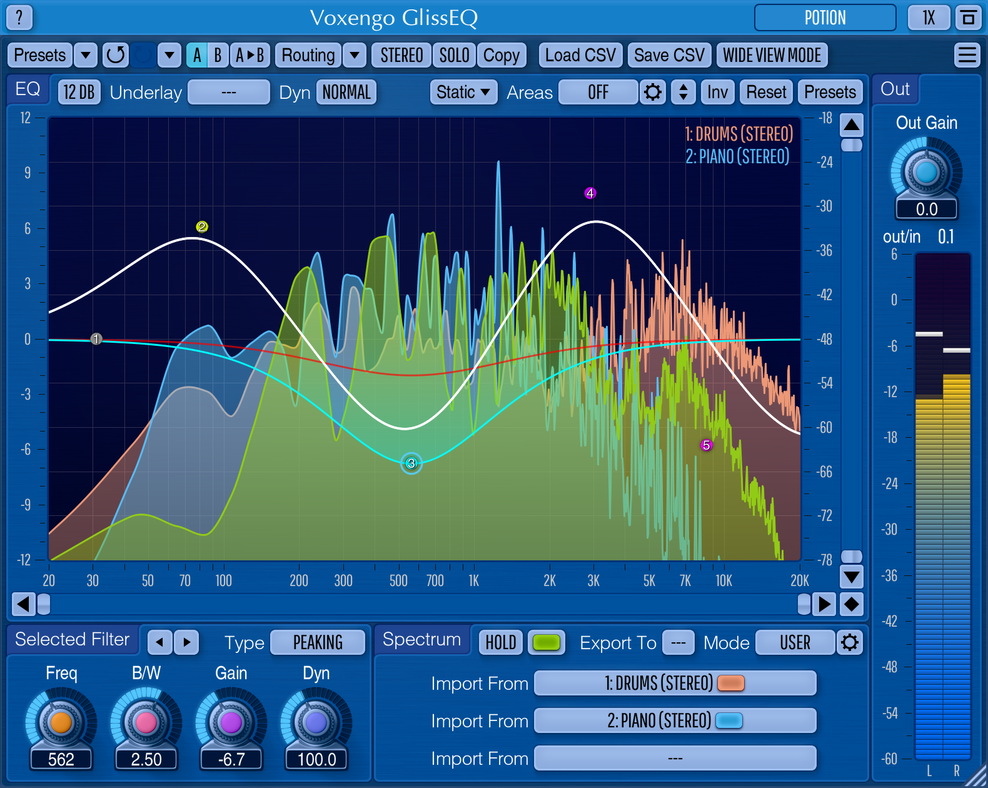
Voxengo GlissEQ is a parametric equalizer plug-in for mixing and mastering. Its dynamic filters change their effective gain in response to the material, so setting a +6 dB boost at 100 Hz does not guarantee an actual +6 dB boost. A filter responds to energy in its frequency band: more energy can mean less applied boost or cut. The real-time analyzer shows a track's spectrum as you adjust the EQ, which can help when balancing instruments that share frequencies.
Dynamic bands and filter choices
GlissEQ provides up to 32 parametric bands and 18 filter types. Dynamic Peaking and low- and high-shelf filters respond to the signal. Peaking Inv reverses the usual dynamic behavior and emphasizes sustain; the user guide recommends it when a cut in a high-energy band needs to reach its full gain reduction. Peaking Hrm adds moderate harmonic distortion, mainly on boosts. Other options include static peaking, 6, 12 or 24 dB-per-octave low- and high-pass filters, notch filters and a band-pass filter.
The Dyn control sets the strength of the dynamic effect, and values near 0 effectively disable it. The Normal mode gives a moderate gain swing. Instant responds faster and more deeply, but can sound busier or produce audible warble on cuts. Relaxed has a slower response with a rounder sound and can sound swishy.
Compare spectra between tracks
To view frequency overlap, place a GlissEQ instance on each track. Set the bass and drums instances to export their real-time spectra to separate slots, then import them into the vocal instance. You can use the comparison to find frequency ranges where one instrument masks another. Imported spectrum resolution and display type follow the settings in the exporting instance. Give each exporter a distinct slot; duplicate slots can produce uncertain imported results. Leave spectrum export off when you do not need cross-track comparisons to avoid its CPU cost.
Processing and compatibility
GlissEQ supports stereo and multichannel processing, internal channel routing, channel grouping and mid/side processing. It uses 64-bit floating-point processing, supports up to 8x oversampling and has zero processing latency. The plug-in runs in a compatible audio host; it is not standalone. Available formats include AAX, AudioUnit, VST and VST3. Voxengo lists 32- and 64-bit Windows support, macOS 10.12 or later, and native Apple Silicon support. The stated minimum computer requirements are a 2.5 GHz dual-core processor and 4 GB of RAM.
Trial behavior
The trial mutes output briefly every 45 seconds. Voxengo says demo authorization uses a text product key and requires no challenge-response, dongle or connection to its website. Its installation instructions also say that an account is not required and the installed plug-in does not need an internet connection to run.