What it does
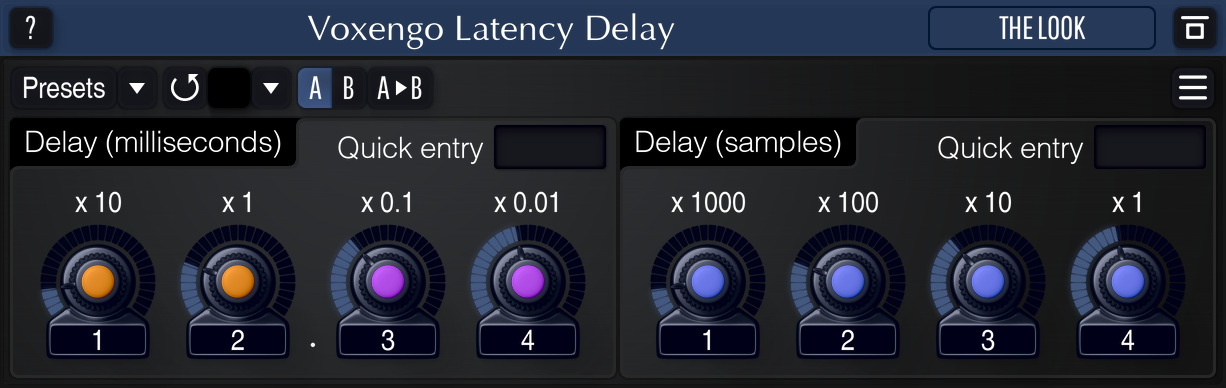
Voxengo Latency Delay is an auxiliary plugin for correcting timing when an audio plugin, instrument, or process creates latency but does not report it to the host. It introduces 10,000 samples of latency, then delays the audio by 10,000 samples minus the correction amount you specify. The host must support latency compensation for this method to work.
It is suited to a track or bus affected by an unreported delay. Voxengo says the amount needed is usually determined empirically, so you adjust the correction while checking timing in the session. The plugin supports stereo and multichannel processing, as well as all sample rates.
Setting the correction
Insert Latency Delay on the track or bus that needs correction. Its millisecond controls allow decimal-position adjustments, and a quick-entry field accepts the delay as one number. A separate set of controls provides sample-accurate adjustment. The sample value is added to the millisecond value to form the overall negative delay.
Compatibility and access
Voxengo lists Latency Delay as free. Separate builds are available for Mac in AU, AAX, and VST3 formats, and for Windows in VST, VST3, and AAX formats. Compatible hosts include Ableton Live, Cubase, Logic Pro, REAPER, Pro Tools, FL Studio, Studio One, OBS, and Bitwig Studio. Check that your host supports the relevant plugin format and its own latency compensation.
Voxengo lists Windows and macOS compatibility. macOS 10.12 and later versions are supported unless Voxengo announces a version as unsupported; Latency Delay runs natively on Apple Silicon. Latency Delay also supports macOS Sonoma, Sequoia, and Tahoe. Minimum requirements are a 2.5 GHz dual-core or faster processor and at least 4 GB of RAM.