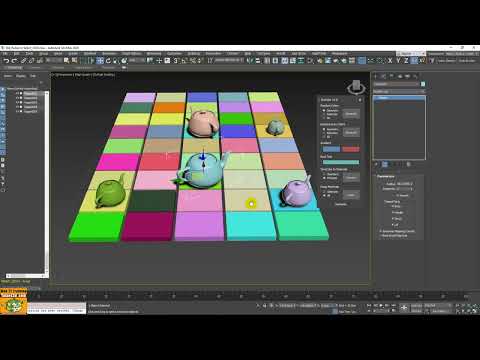
WireColor Pro is a MaxScript utility for managing object wire colors, instances, gradients and materials in Autodesk 3ds Max. Use it to color objects by type or selection, keep duplicated instances consistent, or set up a gradient across selected objects. The developer’s repository describes the tool as formerly ProColor and publishes it under the MIT license. See the developer repository for its source and release details.
Color objects by type, selection or group
WireColor Pro includes Pastel, Gray, Toxic, Clay and Random presets. Its targeting options cover Geometry, Shapes, Groups, All Objects and Selection, so you can apply a palette to part of a scene or work across the whole scene. Enable Instance mode to keep duplicated instances the same color. The group option assigns a color to each group while keeping its members uniform. Undo and redo let you review and reverse changes.
Set gradients and preview colors
The gradient tool applies a transition across selected objects or the whole scene. The developer suggests selecting objects in the order you want the gradient to follow, such as left to right, then adjusting the two color endpoints. A real-time color picker applies color with live feedback, which is useful when tuning a scene’s viewport appearance.
Convert wire colors into materials
WireColor Pro can create Standard or Physical materials from object wire colors and process multiple objects in one operation. It includes automatic material naming and reports which objects were processed. For cleanup, it can remove materials from a selection or from all geometry, with confirmation and error handling described in the repository.
Choose a script format
The .mcr MacroScript is intended for regular use. Place it in the usermacros folder for your 3ds Max installation, restart 3ds Max, then add WireColor Pro through Customize User Interface. You can assign it to a toolbar, menu, quad menu or keyboard shortcut.
The .ms MaxScript is suited to a quick run or portable use. Drag it into a 3ds Max viewport or choose Scripting > Run Script and select the file. The repository says this option runs without a permanent installation or restart.
Check the version and compatibility
The catalog record identifies version 1.24, dated August 24, 2023. The developer’s README lists v1.35, dated December 5, 2025, as the latest release. Check the developer’s changelog for the current release before installing. The supplied README identifies Autodesk 3ds Max as the host but does not list supported 3ds Max release numbers, so confirm compatibility for your setup with the developer’s current files.