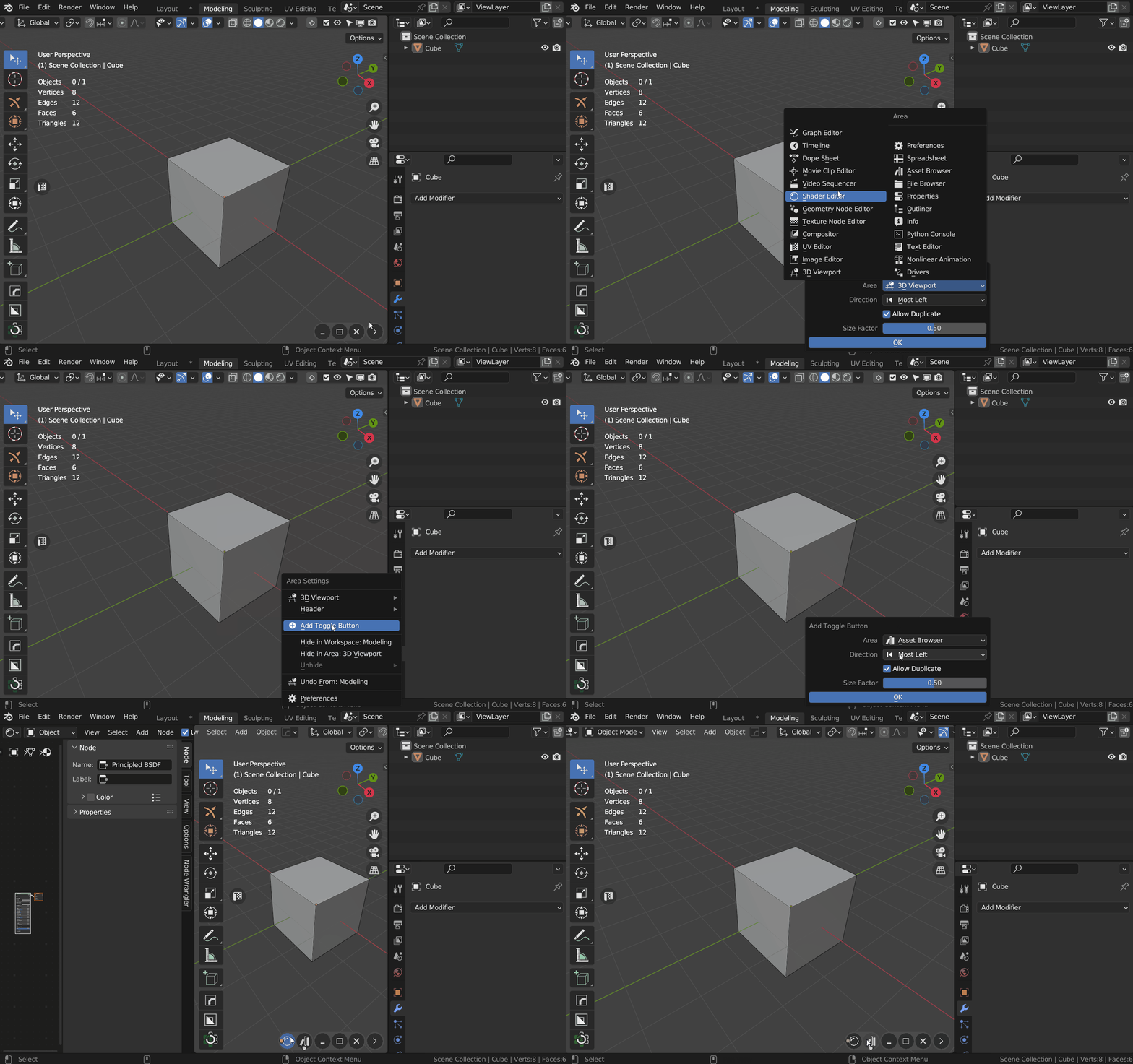
Zen Dock is a Blender add-on that adds a compact, window-style control bar to editor areas. From the bar, you can switch editors, minimize an area and restore it with its tools, sidebars, and space settings intact, maximize a view, or close an area.
Manage editor areas from the bar
Toggle buttons can open an editor, hide it, replace the active area, or open it in a separate window. Zen Dock also includes horizontal and vertical splits. Minimize and restore an area when you want to clear space temporarily, or maximize and restore a view when you need to focus on one editor.
Create buttons for Blender commands
The dock can hold buttons for operators, panels, menus, pie menus, and custom scripts. This makes it a configurable launcher as well as a set of area controls. The toggle buttons guide describes the available button options.
Reuse layouts and workspace windows
Zen Dock can open a complete workspace in a separate window, switch workspaces, and use current-file presets. It also supports saving area properties, editing and locking properties, and importing or exporting button configurations as JSON. The workspace tools guide covers its window and preset controls.
Compatibility and installation
The Superhive listing shows Blender 3.0 to 5.1 compatibility, marks Zen Dock as Blender Extension Compatible, and identifies its type as an add-on and its license as GPL. For setup details, see the developer's installation guide and documentation.